
 Earlier this week, Mindjet announced that it will release the newest version of its flagship mind mapping program, MindManager 9 for Windows, in early August. As part of the pre-launch promotion, I had the opportunity to get a preview of the exciting new features and functionality of this new program. During this briefing, members of the Mindjet team gave me some important insights about the thinking behind this powerful, multi-faceted program.
Underlying philosophy
Like most mind mapping programs, MindManager has suffered from “feature bloat” during the past few years. In other words, software developers keep adding new features, well beyond what the typical business person will ever use. The result is overly complex, hard-to-use software that can be daunting for new users. In developing the product plan for MindManager 9, the Mindjet team decided to focus on usability and “use cases” – in other words, they observed their customers using the software, watched for areas where they were struggling and strived to learn why, so they could improve the product to make their life easier.
What’s especially smart about this focus is that Mindjet didn’t just conduct research with experienced users, they also had newbies sit down with the program, to see how quickly they could figure out basic tasks, and where they got stuck or confused. They realized that the real power isn’t in “preaching to the converted.” Rather, it comes from attracting new people to mind mapping and MindManager.
What’s new in MindManager 9?
Key priorities for this release of MindManager included helping users to get work done faster, to help users to do basic project planning and execution (designed around “the rest of us,” not professional project managers) and to help users to communicate their ideas more effectively.
Here’s a summary of what’s new in MindManager 9, and why it’s important to you as a business user of mind mapping software:
Dynamic Outlook dashboard: One of the most important features of MindManager, in my estimation, has been its integration with Outlook. An increasing amount of knowledge is embedded in e-mail messages, making it critical to have a way to efficiently move these ideas into mind maps. Starting with MindManager 7, it became possible to select a message in Outlook and send it to the MindManager map you’re working in. Last year, I told you how I used MindManager and Outlook to efficiently prepare a very complex e-newsletter. One limitation was that I had to keep switching back and forth between the two programs to move individual e-mails into my mind maps.
I’m happy to say that Mindjet has taken Outlook integration to a much deeper level in MindManager 9. In short, you can query Outlook 2010 for e-mail messages, tasks, appointments and notes and pull this data into your mind map – without leaving MindManager. That’s very powerful.
MindManager 9 includes a pre-set collection of Outlook queries, or you can create your own. Outlook contacts can be easily added to your mind maps. One major advantage of this is that the person’s e-mail address becomes a separate sub-branch, with a “mailto” link for their e-mail address. If you want to send them an e-mail, you simply click on that link icon and a new Outlook mail form opens, pre-addressed to that person. This eliminates several steps (switch to Outlook, click on the new message toolbar button, look up the person in your address book, etc.). When you’re importing tasks, MindManager incorporates start and end dates into your mind map, and retains Outlook’s color coding.
Sharepoint integration: Currently handled in a special MindManager for Sharepoint version, this will be offered as an optional add-in to MindManager 9. It enables you to set up sophisticated queries to search for and gather data from multiple Sharepoint sites within an organization, making it the perfect tool to tap the potential of the knowledge stored within these corporate silos.
Improved project planning: In MindManager 9, Mindjet has integrated the functionality from the project planning add-in it acquired last year, JCV Gantt, into the core product. This is reflected in a new Gantt view, which is auto-generated from the tasks in your mind map. Significantly, MindManager 9 looks at the estimated number of hours each task will take to complete and other factors to calculate whether or not each person on your team is over- or under-utilized. Nice! Despite the fact that Mindjet has integrated two programs into one, the price of MindManager 9 will be the same as that of version 8. Same price, more value.
Enhanced presentation mode: For years, the presentation mode of MindManager has consisted of a stripped-down screen with map navigation controls at the bottom, which enabled you to walk through the content of your mind map, branch by branch. This was one area where users said they wanted more control over what appeared on screen. Many mind maps contain a combination of presentable information and background or proprietary content that you don’t want to share.
While conducting its research, the Mindjet team came to the realization that most presentations aren’t done at a podium with a large audience. The more typical usage scenario is a small group sitting around a conference table, planning their next project – a much more informal, interactive setting. So they sought to address these needs in MindManager 9’s presentation mode.
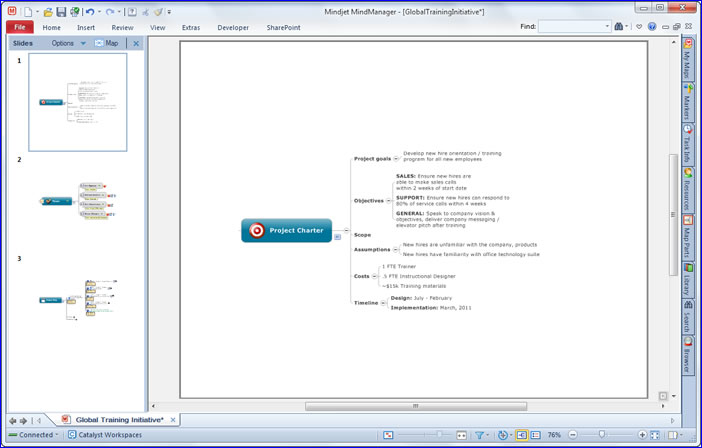
Mindjet redesigned the presentation mode of MindManager 9 around a slide show model. To use it, you simply click on a topic to select it and right-click to access the “make slide from branch” command. You can also select topics using a drop-down list in a new “slides” toolbar button in the program’s View menu. The selected topic and all of its subtopics appear as a slide in a vertical pane on the left side of the screen. Within it, you can drag and drop slides to change their order (click on the image above to see a larger version).
Mindjet purposely redesigned the presentation view in version 9 to behave just like PowerPoint, a program that most business people are very familiar with. In fact, MindManager 9’s overall look and feel is meant to make users feel like it is an extension of Office 2010 – almost as if it is the visual mapping program that Microsoft forgot to include in the Office suite. I think this makes a lot of sense. Why? When you’re trying to get people to try something new like mind mapping, it helps to frame it in terms of something else they’re already familiar with, such as the two-paned PowerPoint interface.
When you’re ready to make your presentation, you simply click a “slide show” button, and MindManager 9 shows the familiar Presentation View – only now, instead of displaying your mind map with all of the topics collapsed, it shows your slides, one at a time. You can easily annotate your map and add notes in the presentation view, which makes it ideal for small group presentations like the one I outlined earlier. It should also help in reducing “map shock” in non-mind mapping users, because they will see only a part of the presenter’s mind map at one time, not the overwhelming whole.
Mindjet isn’t the first to use this model for making presentations from mind maps, but I believe it’s the right approach. It’s much easier for new users to understand than the old way, and it gives you a fine level of control over the map content you show in your presentation, which many users will appreciate.
WYSIWYG printing: The lack of flexibility in printing your mind maps has been a complaint of MindManager users for many years. Mindjet addressed these concerns in MindManager 9. But the way they went about it is very clever: You can now use the slides you create in presentation view to designate the sections of your map you want to print. Neat!
Performance improvements: MindManager 9 was significantly rewritten to improve its load time when you first start it up. It also uses Windows system resources more efficiently than its predecessors. MindManager 8 was notorious for using a significant amount of memory when it was open, even if you weren’t editing a mind map. This effectively ran down the batteries of many a laptop. This problem is solved in version 9; it also promises to handle large, complex maps better than its predecessor.
Redesigned ribbon toolbar: Mindjet has made a significant investment in usability testing to make the program easier to use. This is reflected in MindManager 9’s revised ribbon toolbar, which features improved groupings of commands based upon how people really use the program. To make it easier for first-time users, Mindjet grouped its more advanced features under a new “extras” tab. Within this section of the toolbar, you can access Catalyst workspaces, conduct web conferences and do brainstorming.
Conclusion
Based upon what I’ve seen so far, MindManager 9 looks like a must-have release. The tighter Outlook integration, improved presentation mode and enhanced printing capabilities make it worth upgrading from earlier versions of MindManager to version 9. MindManager 9 is the most improved version of this mind mapping program – ever.
For people who have never used mind mapping software before, MindManager 9 promises to be the easiest version of this program to use, ever. For corporate IT departments that can’t quite understand why they should deploy a visual mapping tool like MindManager, the Sharepoint integration is the coup de grace.
Mindjet says MindManager 9 for Windows will be released around August 10th.
Leave a Reply