
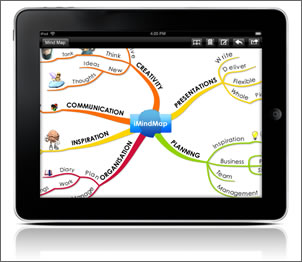
ThinkBuzan releases iMindMap Mobile HD for iPad
Sep 3rd, 2010 | By Chuck Frey | Category: Software
ThinkBuzan is the latest developer of mind mapping software to launch an iPad app, iMindMap Mobile HD. This innovative tool brings the organic experience of creating visual maps in the highly intuitive iMindMap to the tactile environment of Apple’s popular iPad. Its features include:
- A presentation mode, which you can use to share your ideas branch by branch on any screen. Forward and back arrows enable you to move back and forth through your mind map, while a vertical column of topic names displayed on the left side of the screen enables you to jump to other vies of your map. Any notes attached to topics appear on the iPad’s screen, so you can refer to them during your presentation. This looks very slick!
- A variety of export formats, including image, PDF and iMindMap files. You can further edit maps created on iMindMap Mobile HD on the program’s desktop version.
- Speed mind map mode, which enables you to capture your thoughts quickly and easily; the app automatically arranges the new branches for you.
This app looks very promising, but at US$32.99, it’s definitely a premium-priced tool! Still, if you’re a user of the desktop version of iMindMap and own an iPad, then purchasing this powerful mobile mapping tool is a small investment, indeed.
Popularity: 4% [?]


You have forgotten the most importatn feature which is missing – there is no sync between maps in your mac and iPad… which is unbelievable !!! This is the key feature !!!
Seriously? That is unbelievable…. there must surely be someway of synching- like via the net ? Let us all know more!!!
You can export a map created on the iPad via email to your desktop, and open the map with iMindMap. You can't yet transfer a map created on your desktop to the iPad version. You can now send an iMindMap desktop created map to your iPad via DropBox and open it with iThoughtsHD. I suspect ThinkBuzan will soon be giving us a full synch capability.
We are discussing about iMaindmap HD for iPad!
THERE IS NO MAIL FUNCTION!
Only export to image or PDF.
Frank, it actualy says in the HD help:
An imm version of your map will be created alongside whichever export option you select, which will allow you to modify your map further using the iMindMap desktop product. Your map will be added as an attachment to an email and presented using the familiar mail interface.
So, your statement is incorrect; your export options are IMM and PDF, or IMM and Image, both of which use a mail attachment.
I have to say, I'm disappointed at all the mind map offerings available. Mind maps are supposed to be highly graphical, yet simple, but it's as if these apps have been created by mathematicians rather than designers. For me the best thing about iMindMap on the iPad and desktop is the organic looking branches, they reflect Buzan's concept of mind mapping (and so it should). The others end up looking like complicated schematic diagrams.
What frustrates me the most is the way images are handled in iMindMap (and others) for the iPad and Desktop. It's like clunky 1990's software. The best implementation of images I have seen yet is in "MyThoughts" on the Mac. You can just drag an image from anywhere on to a branch or as a central image, and it honours transparency, beautiful
So there's no white square around the image.
I use Sketchbook Pro and Noteshelf on the ipad for sketching and can save the sketches to the photo Library, I want to be able to either copy and paste or import the sketches into iMindMap HD and attach to branches or central image. Also, would be fantastic if PNG images could be imported, honouring the alpha transparency (no ugly white squares behind the image).
The Screen shot above is not from the current iMindMap HD version that I have. It looks like it does what I want it to do with images. Is it a new version coming out or is it just a grab from the desktop version?
Anyway, enough ranting from me. I hope the developers read this and something positive happens.
[...] iMindMap (pictured above) brought its organic mind mapping model to the iPad, creating an experience that’s closer to a hand-drawn mind map than anything I’ve experienced. [...]
I am really disappointed with the ipad app. Doesn't even follow Buzan's mindmapping rules!! Feel ripped off really. Most money I have spent on an app and the biggest disappointement. Save your money unless they are bringing out an update.