
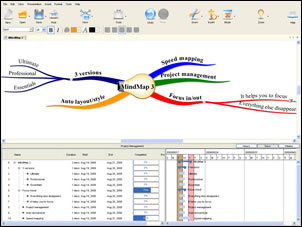
iMindMap 3 released; improvements address my concerns
Sep 10th, 2008 | By Chuck Frey | Category: Software
I recently wrote a review of an early beta version of iMindMap 3 that suggested that the program was still a bit rough around the edges – that some of its features and capabilities didn’t measure up to my expectations.
I’m pleased to tell you that the developer took my concerns seriously, and has addressed many of them in the final version of the program, which is now available.
Here are several of the improvements that they made, in response to my review of the beta version:
More ways to add topics in speed mapping mode: I lamented in my review of the beta version of iMindMap 3 that adding new topics while in speed mapping mode was less than intuitive. In response, the developers have added 3 new ways to add new child topics to your maps:
- INS – to add a new child (and to make it the active branch)
- RETURN – to add a new sibling
- CTRL + SPACE – to edit the label of the existing active branch
Toolbar enhancements: In my last post, I said that I thought that the iMindMap 3 toolbar, with a small number of large toolbar icons, looked somewhat less than professional. The developers addressed this by enabling users to right click the toolbar and select large icons, small ones or small ones without text. I also heard from managing director Chris Griffiths that his development team’s goal in designing the toolbar the way they did was to decrease the number of toolbar buttons (which tend to confuse new users) and ensure that the program didn’t get in the way of users’ creative flow. I guess that makes more sense, now that they have explained it to me.
Adding links and notes to maps: In my first review, I indicated that I couldn’t figure out at first how to add links and notes to my maps. Chris indicated that the program usually ships with help files and instructional videos (which my beta version didn’t have) which should help new users understand how to do this.
I should have iMindMap verson 3.0.2 in my hands shortly, and will let you know if I have any other observations. I will say that I’m blown away by the responsiveness of Chris and his team. They took my feedback to heart, and did something about it. That’s more than you could ever hope to expect from most software developers. Thanks, Chris!
Popularity: 27% [?]


Unfortunately this final version of iMindMap V3 doesn’t cut for me overall. I think this is a quality application but it falls down in the usability and efficiency areas for me. “A map made by you and not for you” is the mapping paradigm for iMindMap and this approach hinders someone like me who has been using MindManager for years before iMindMap got into the game. Thus, iMindMap emphasizes your involvement in a map by you with far too many clicks, drags and dialogue boxes.
For better or worse, I’ve become quite accustomed to the usability and efficiency of MindManager even though I love the organic map option of iMindManager. I was looking to switch because I’m more of a Mac user than a Windows user these days. MindManager on the Mac leaves a lot to be desired but it is fantastic on the Win platform. I’ve been a Windows users up until about a year ago when I switch to the Mac for most of my personal computing. I still use Windows heavily in my day job however.
For iMindMap, the lack of an option for in-order, clockwise creation of branches (both Map and Speed Modes), lack of good shortcuts for branch creation and management (Mind Map Mode), dialog boxes without good shortcuts to manipulate them for items like adding notes, links, etc., lack of flexibility in Speed Mode and no real Brainstorm mode seems to conspire against the speed and efficiency I’m personally looking for.
For me, branch ordering is highest of importance. I use this way of building maps the most because as a technology architect, logical flow of information is important for building visual connections between processes and groups of processes. And I need to build information maps quickly. Free form, random branch, mapping is great as well and a good Brainstorm mode with a flexibility in building maps is an important option as well. The Brainstorm in MindManager is a very useful option when needed. Adding pictures, graphics, symbols, and colors are all secondary and tertiary priorities for me and “may” be added to a map later depending on my learning, memory and reference requirements for a given map.
So I need a tool the supports my knowledge creation and management. I feel iMindMap works against my personal approach. All the other features fall short as well and seem a bit gimmicky to me yet they are functional if not truly useful over the long term. On the Mac, iMindMap gives a MindManager a run for its money if you are okay with slow and involved map building approach of iMindMap and looking for a good number of features but on the Windows platform, iMindMap has quite a bit of ground to make up in features and flexibility.
I do use MindManager for Windows on Mac (via WMWare Fusion) when I need features the Mac version doesn’t offer. However, my search for a good Mac based mapping software tool that I can settle down with continues. For now, I’ll continue to use PersonalBrain and MindManager (a very powerful combination I might add).
TL
Some of those comments are not just yours, but I think many people wanted them, including me. I proposed similar and some the same stuff to be made. So I think that features most wanted are in first developed. Development team could answer that.
VK
One feature that I really like is the sketch tool and in v. 3 it has several enhancements. It includes: a dropper tool, a spray tool, a paint brush tool and different shapes. I am not familiar with other mind mapping software so I don’t know if something like the sketch tool is part and parcel. This is my first look at v.3 and I anticipate there will be more improvements along the way. I liked the look of imindmap from the first time I saw it (version 2.0) days. So easy to use!!
Thanks, Chuck, for mentioning the icon size configuration; I would have missed it.
I got my v3.0.2 of iMindMap yesterday and I have to say it is brilliant. I read the previous posting from TL and I disagree with most of the comments.
iMindMap V3.0.2 does allows rapid creation of branches (brainstorming mode if you want to call it that).
With the new enhanced Speed Mind Mapping Mode you have several options for creating new branches quickly and lots of shortcuts to add things such as notes. Inn Speed Map mode there is almost no difference in the functionality between Mind Manager and iMindMap. You can also set iMindMap to automatically sort new branches into Ascending or Descending order which is a really nice feature.
What I really like about iMindMap over other tools is that I have the choice to draw my own map freehand style in organic mode using a mouse, or I can just use the keyboard and have the map created for me in speed map mode. Best of all I can use a combination of both modes and I can use speed map for capturing ideas and let the software draw the map for me, and then I use organic mode to play with it afterwards. The combination of being able to create my own map, or let the software create the map for me is what sets iMindMap apart from everthing else.
I am always trying to find a “better” tool to my Mind Mapping challenges and I thought I’d find it in IMINDMAP 3 based on the glowing reviews… I love all the “extras” that I don’t get with MindManager.
BUT
All of the customization, keyboard short cuts and speed seem to be missing.
I am running a 30 man software shop and I need to be hyper efficient with my tool time.
So in mind manager if I have a list emailed to me of 6 tasks, I copy paste it to MM and 6 separate branches.
Found a few other “can do it but the method of triggering it is different” examples.
So to the Product Managers of IMINDMAP…
a) almost there…
b) make sure all the keyboard short cuts and copy paste results in Mind Manager WILL work in iMINDMAP…
c) Mind Manager ninjas will only make time to try something out (your software) if they can reasonably mimic their old software (ie Word & Word Perfect users).
Good luck!
Dan
I’ve been testing iMindMap since it’s first trial was made available. From the beginning I liked the aesthetics and regretted the missing of features already found in similar applications, namely MindMapper and Xmind, not to mention the omnipresent Freemind. But iMindMap has something else which makes it very appealing. It looks really good.
Also from the beginning I found the application very unstable, working with branches was a huge, time consuming, painful and stressing job, with unsolvable branch overlapping, not to mention the unexpected weaving of branches into a unrecognizable cobweb pattern, that could occur at any moment, with the map irremediably lost.
In this version the same problems occur but, wait, opening and closing the Auto Layout’s window tool solves 99% of the problems. The fear to lose a map was gone. Moreover, moving around a branch and its sub branches became a piece of cake. But, there is always a “but”, manually created maps looses its design once the auto layout is opened. I can leave with that.
For this last version of iMindMap, I was tempted by the speed mapping mode, project management and the export features. So, I decided to give it a go.
What did i wrote? Export features? Forget it. They are not available in the trial version. So, if cannot be tested, I assume they do not exist. Or do they? It seems the interactive presentation does, at least I downloaded a ppt presentation from the Buzan’s site. The same applies to an unnumbered outline in the MS Word format. And no, there aren’t MS Project examples to download. I do believe in the good faith of the authors and will not jeopardize their credibility. But others may state that the existence of these examples doesn’t mean they were created with iMindMap. Still on the export features, iMindMap, like many others, doesn’t export to Freemind. It’s unfair.
The Speed Mind Map mode and the layouts (ranging from Linear to Organic, and from Organic to Radial) available with it are a welcomed feature. I really do like the aesthetics of the maps produced with the organic layout under the speed map mode. Importing from Freemind is a feature available, which allows for improved cosmetics to the Spartan look of the maps created with Freemind.
Nonetheless, we already find in other similar software features still not present in this version, that enhance the productivity in building mind maps. Working and rearranging branches in a big map created with iMindMap may be slow and almost painful, and the font size in the label’s entering text box is too tiny. Creating sub-sub-sub branches on the right side of the map is guessing, as the software do not scroll right to show the new branch. On the left side of the central idea, labels may decide to not align to the end of the branch.
Moreover, branches can only be selected by clicking the branch line, not the label. It would be easier and fast to create a complex map with Freemind and then importing it into iMindMap for a better look. By the way, in iMindMap we cannot copy an entire map to a branch of another map. The central idea is not “copyable”.
Order of branches cannot be defined as radial clockwise or reversed clockwise, which may call for a repositioning job of the first level branches. An order number of a branch can be viewed and changed, but it doesn’t change the position of the branches in the map. By the way, I’m still trying to fully understand the reasoning underlying the “increasing” or “decreasing” ordering settings in the Auto Layout tool. The help text sates the map will be ordered either alphabetically or numerically, in increasing or decreasing order. Looking for the map I had at hand, I wondered if it meant from left to right or clockwise/anticlockwise, with the former starting at the 1 o’clock quadrant. Building another simple map filled with some letters, I recognized the clockwise pattern for the increasing order. But when used a note taking map, that didn’t hold. I did inspect the later for blanks in the beginning of the labels, but that wasn’t the case. Then, I found It ordered first capital letters and then the small cap letters. For the software, “a” comes after “Z”. By capitalizing the first label letters in all the first level branches, I got again the clockwise pattern for the ascending order. Doesn’t make much sense, does it?
The Presentation features aren’t still at the level of good new kids on the block, as Xmind, neither is the welcomed Focus In feature, restricted to only one level of “focus”, with the so called “presentation” features being disabled. I did find that in the original map some branches changed the position they had before the “focusing in” action. Not good. By the way, the Presentation features only deals with the expanding and collapsing of branches. It’s time to have a presentation mode as good totally integrated in the software, as good as the interactive presentation exportable to power point.
Multi-line/row text labels are a restricted feature to a maximum of two rows, and only available in the more manual Mind Map mode, not in Speed Map. Again, it didn’t work always.
Drag and dropping of a selection of branches isn’t still available. Selecting, copying and pasting are the only solution if more than one branch is involved.
Linking branches within the same map or between different maps, with an internal link and not, of course, a graphical arrow, isn’t still on the “menu”.
Text Mode? Maybe this is a “to be Text Mode” still on the works. Well, in a kind tone, I would say this is an unnumbered “Outlined Text View” of labels, as nothing more happens, once it’s not allowed to work on it. For instance, we cannot change the branch positioning, correcting labels, or even numbering the unnumbered outline. Not to mention the fact that the more complex formatting of the text in the branches’ notes do not hold under this text mode view. This is true, at least, for numbered or bulleted lists, as well as for tables.
For a long time I’ve dreamed with a sort of a GTD and a Project Management application integrated in a “normal” mind mapping software, without smoking my bank account. For the time being GTD is out of question. And the PM application is, I believe, a work still in progress. For sure new developments will be brought. Resource management is incipient and resource costing may be still on a requirements list. Only the resource’s working time is manageable. Right, planning is all about time, but when it comes to costing, other resource unit matters (as “number units”, e.g. liters, boxes, Kg, and so on), and for the time being they do not fill in. The time allocation is a rare curiosity to me. One hour allocations are feasible and not. In this respect, the Gantt chart is misleading. By reading it, anyone would findd that a task starting at 9 am, already consumed one hour, from 9 am to 9:59 am. Despite the next minimum ending time allowed being 10 am, when checking the Gantt chart I realize the task started at 9:00 and ended at 10:59:59. Both the columns of the hour 9 and that of the hour 11 are fully shadowed. Despite that, the software still allows for a dependent task to start at 10:00 am, providing for a misled reading of the Gantt chart. At least, it’s curious.
Working within the list of tasks is unnatural. Tasks cannot be dragged and dropped within the list. Nor can they be copied and pasted. Increasing or decreasing indenting directly in the task list is something belonging to my wish list, not a feature available. A first level task can be created but, if created in the middle of the production of a task list, it will be positioned in the end of the list and can only be repositioned using the mind map. Yet, a subtask can be created under other subtask or a task but not repositioned directly in any other place of the list.
Let’s check the portability. This software isn’t portable. I did install it in a pen drive and it assumed to be installed in the drive letter assigned by my home laptop during the installation. Any time a computer assigns a different drive letter to the pen drive the software will not run. I’m an unlucky person. My work laptop assigns the drive “G:” to the pen, while the home laptop assigned an “F:” to it, during the installation.
I have no doubt the maps produced with iMindMap are organically beautiful and have an important visual impact. That oganic “thing” do invite thoughts to came out, and helps memory. Moreover, I take the price target as affordable and fair, if the advertised features are delivered and improvements made. For the time being, this software is a (good) work in progress. And I’ll be here to test it, for what will be available in the trial version with its unadvertised restrictions. The later is an unnecessary trick. I didn’t like the meager 8 days for testing, nor the impossibility of viewing the maps created after the trial testing period. This is too exquisite for the current market practice.
i just want to say that before MindManager became what it was today by Mindjet, it was the original only official tool endorsed by Buzan. It followed the Buzan principles of mindmapping, organic branches, use of images as titles, etc. Mindjet has now strayed from the Buzan principles and evolved into more of a productivity software for biz purposes, so Buzan has to go & commission another software company to create iMindMap. I still have my original 2002 MindManager version that looks quite close to what iMindMap is today. iMindMap is still evolving & I hope it becomes as fun & easy to use for those of us who would like to use it as a metacognitive, information vizualization tool for brainstorming, recall and radiant thinking. i’ve tried it & still struggle somewhat with it. i hope the developer fine-tunes it further to make it easy to export to the web with all the animation & notes.