
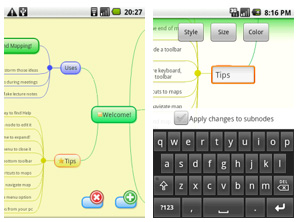
 In much the same way that developers have written a significant number of mind mapping apps for the Apple iPhone/iPod Touch platform, similar apps are starting to emerge for the Android smartphone operating system. Here are two that I’m aware of (please add a comment if you know of any more):
Mind Map Memo: This app enables you to copy and paste topics, change node colors and icons, change the map background color and import and export maps with the popular open source desktop mind mapping program FreeMind. Mind Map Memo can be downloaded for free from the developer’s website.
Thinking Space: Thinking Space enables you to create nodes, arrange them, and add notes to them. You can style map nodes in different shapes and colors (including adjusting node text, text color and text style), and tell the program whether or not styles should cascade down to subtopics. Surprisingly, Thinking Space even supports keyboard shortcuts! An “arrange” toolbar makes it easy to move the selected map node up or down one level in your maps, or to move it by cutting and pasting it. Maps created in Thinking Space are compatible with FreeMind and XMind. In addition, the app has support for storing your maps on a web server – which the developer describes as “cloud functionality.” The Thinking Space Cloud Portal enables you to track revisions to your mind maps, and to share them with others. This neat app offers some excellent functionality and, like Mind Map Memo, is currently free.
I don’t own an Android phone, so I can’t test these apps. But based upon my experience using mind mapping apps on the iPhone, such apps need to be able to support some basic functionality:
- Easily add, edit and rearrange topics.
- Enable you to attach notes to topics.
- Enable you to attach hyperlinks to topics.
- Easily move your maps off of the handheld device for further development in your desktop mind mapping tool of choice, or to share with others.
As far as I can tell, Mind Map Memo doesn’t support notes or hyperlinks. So Thinking Space appears to be the app to beat on the Android platform.
Leave a Reply