
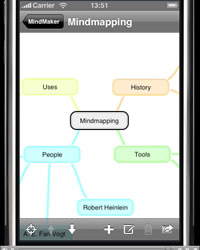
Mind mapping comes to the Apple iPhone
Sep 23rd, 2008 | By Chuck Frey | Category: Mobile Mapping Tools
The first mind mapping application for the iPhone was recently released. Dubbed MindMaker, it is availabe via the Apple iPhone AppStore. Very little information is available about this tool, other than a brief QuickTime video that shows what its capabilities are. As you might expect on a platform with limited memory like the iPhone, MindMaker’s functionality appears to be fairly basic: you can create topics and sub-topics, move them from one position to another within your map by tapping and dragging. That’s about it so far.
An “update” page on the MindMaker website promises that some new features will be available soon, including saving mind maps as image files, support for landscape mode and a “translucent hideable interface” – whatever that is. Also planned for future versions are cross links between nodes, reordering of nodes, editable colors and the ability to export maps to different formats.
One of the most important unanswered questions in my mind is this: What can you do with maps created in MindMaker? Can you export them to FreeMind, MindManager or any other desktop-based mind mapping tool? It would be wonderful to start developing a mind map on your iPhone, and then be able to export it to a desktop program for further development and refinement. As of this writing, no further information is available on MindMaker. Hopefully, more details will be forthcoming from the developer!
I don’t own an iPhone, so I can’t tell you if it’s a good program or a piece of crap (as many iPhone apps available in the AppStore are turning out to be). Has anyone played around with MindMaker? If so, please share your thoughts, pro or con, in the comments section of this post.
Thanks to Tris Hussey for the heads up on this new visual mapping tool!
Popularity: 35% [?]


Well, i played a little with it. It works fine, but is clearly a first basic version.
Right now it is not possible to change the map by dragging and dropping nodes.
You can only create and delete nodes and give them another position. Only the text in the nodes is editable. In fact, you can not do more than that.
But, what is there right now looks good and is a good point to develop it further.
Hello Chuck,
I just wrote a post on MindMaker. I’ve been using it on my iPhone. Overall, I think it is a pretty good app. For more on my thoughts see my post. Click Here Have a good day. —Chance
MindMaker is a really small, but already yet smooth application. Working with it is really easy, and new mind maps are created intuitively. Nevertheless, with the lack of any export functionality, your mind maps create solely on your iPhone. Thus, my major use case to collect ideas in a mind map when travelling and to work them out later at home on my desktop is not possble yet. But on the other side, at least you can write down your ideas as mind map on the road.
All in all, MindMaker is a good start into Mind Mapping on the iPhone. Nevertheless, it has to be extended to increase productivity. Currently, it’s just a structured way to collect your ideas initially.
– Yoop
Chuck,
There are two mind mapping iPhone apps now, and another that lets you draw them by hand (or finger).
MindMaker is clearly in the very early stages. The latest, iBlueSky, is more sophisticated in appearance. And the ‘hand made’ one, Zeptopad, seems to aimed at least partly at the mind mapping market – their screenshot is of a mind map. But it’s really a general purpose, draw-with-your-finger application.
I just blogged about these here:
http://www.mind-mapping.org/blog/2008/09/iphone-ipod-touch-mind-mapping-software/
Regards
Vic Gee
http://www.mind-mapping.org/
The master list of mind mapping &
information management software
[...] of the biggest shortcomings of MindMaker, another iPhone mapping application that I recently featured in this blog, is that there doesn’t seem to be a way to move your maps off of the iPhone and into a [...]
A new version 1.1 of MindMaker is now available that brings MindMaker to the level of iBlueSky.It adds exporting as well as landscape mode – a big improvement compared to the initial version. The developers are on a good way and hopefully enhance the application even more, e.g. with import, notes and formatting support. Thus, MindMaker is now really worth to give it a try.
Hi,
This is a nice application however it does not offer true mindmapping capabilities.
Although it does produce something which some people might think looks a little like a mindmap, it is a long way from enabling its users to undertake a valid mindmapping process or produce an effective mindmap.
The number of reasons why this is the case are too numerous to mention here however the following reference (googled ad hoc for this post) shows some of the basic principles which make a mindmap a ‘mindmap’ and not the bubble-enclosed/spider diagram produced using Mindmaker:
http://www.mind-mapping.co.uk/make-mind-map.htm
Regards, Lawrence
i believe a good mind mapping app is actually iThoughts. much more flexible and compatible to mind manager novamind.
Check out the full functionality breakdown:
http://www.productiveorganizer.com/to-do-list/mind-mapping-for-iphone-ithoughts-review/