
 TPAssist Limited recently announced the launch of a new MindManager add-in called TPAssistCapture, which enables you to quickly capture ideas, tasks, notes and next actions and send them to the mind maps that you use to manage them. I recently evaluated this program, and was pleasantly surprised with its power and flexibility.
When you first install TPAssistCapture, it asks you to create any “quick links map” in MindManager, which defines the categories and tags actually used to classify your tasks, notes and ideas, and where items tagged with each category should be sent. This map is simply a set of topics corresponding to tasks, next actions, ideas and so forth, with hyperlinks to the maps you normally use to capture these items. What’s more, TPAssistCapture installs a right-click command in MindManager, which enables you to designate a specific topic within a map as the place where new items should be added as sub-topics. Very nice! When you run a separate “process” command in TPAssistCapture, the program uses this quick links map to distribute each item to its proper location.
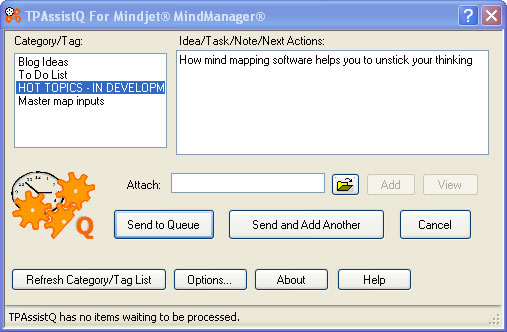
TPAssistCapture runs as a “capture” icon in the Windows system tray. When you want to capture a bit of information, you single click this icon, type in your note, tag it with a category and send it. The program retreats once again to the system tray, so you can get back to the project you were working on. Each item entered into TPAssistCapture is placed into a queue for later processing. You can easily send multiple items using a “send and add another” button in the dialog box – a nice option if you have a bunch of ideas that you want to record at the same time. The program also gives you the option of attaching a file to any item entered in this dialog box as well. The system tray icon displays a tool tip that tells you how many items are waiting in the queue.
TPAssistCapture also provides you with another way to enter items: a “send map” command that takes an entire maps and adds it to the queue for processing. It stores the fully qualified name of the mind map in the queue, which is then used during processing to attach the map to the appropriate map and topic. The developer says this method is especially useful for processing notes during phone calls, ad hoc brainstorming or recording meeting minutes. I can foresee how this command could be used to create a map on the fly and then use a tag that you have set up in the quick links map to automatically attach it as a sub-map to your master map. I tried this with a few test maps, and it worked like a charm, with one minor limitation: you can only send to a topic, not to the central idea of your map.
You process queued items from within the TPAssist tab of the MindManager ribbon toolbar. When you click on the “process” command, the application opens each queued item, finds the associated quick link, follows its hyperlink and inserts the queued item as a new subtopic at the location specified in the quick links map. In addition to assigning items to MindManager maps on your computer, you can also send them to those you have stored in your mind jet connect account – nice!
If your job involves capturing and manipulating ideas, or if you frequently work with ad hoc, linked mind maps, then TPAssistCapture should be an essential part of your MindManager add-in toolbox. The program is a free download, but restricts you to creating only 6 categories or tags. If you purchase the developer’s flagship product, TPAssist (a task management utility for MindManager), this restriction is lifted.
Leave a Reply