
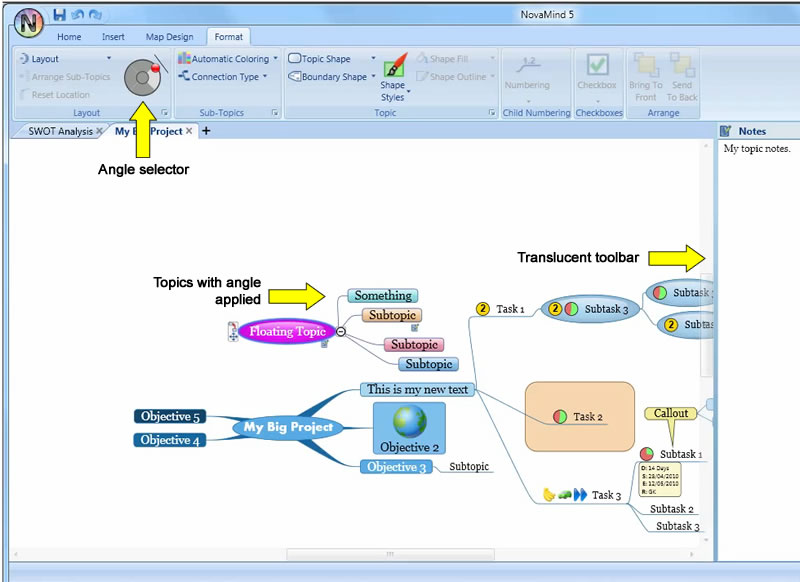
 The NovaMind development team has always been focused on being innovators, and NovaMind 5, released on April 28, 2010, is no exception. This innovative new version makes it easier to create high-impact visual maps than any other program on the market – period. It provides beginner, intermediate and advanced mappers with an impressive breadth and depth of features and functionality, yet never overwhelms. Thanks to some excellent user interface design, NovaMind 5 is also surprisingly easy to use for beginners and advanced users alike.
Let’s take a closer look at what’s new and most notable in NovaMind 5:
New layout engine
Perhaps the biggest change in NovaMind 5 is its all-new layout engine, which automatically keeps your map as compact as possible and minimizes white space – especially useful if you want to print a mind map on regular-sized paper. The program automatically arranges the topics in your maps in the most compact form possible, only moving topics the minimum amount to prevent them from colliding with each other. This makes NovaMind 5 unique among mind mapping software programs, most of which insert large amounts of white space to prevent topics and subtopics from “colliding” with one another.
According to NovaMind Pty. founder Gideon King, there is some sophisticated behind the scenes programming that make all this happen smoothly. The result is very impressive to see in action. As you add new subtopics to a branch, any adjoining branches automatically move out of the way – but only the minimum amount to keep the topics visually separate. If you shorten a topic’s name or collapse a map branch, the other topics around it move in to absorb the extra space created. The layout engine handles callouts, floating topics, shapes and boundaries in much the same way. For a video that shows this new layout engine in action, please click here.
NovaMind 5 does all of this “space control” automatically, but still gives you the ability to drag and drop topics anywhere you want them, while still managing all objects on screen to keep them from overlapping with each other. If you do drag and drop a topic or branch so it overlaps another, the second object will automatically and smoothly move out of the way. Nice! If you’ve worked with any mind mapping program and wanted to adjust the location of a topic to improve the look of your mind map, but the program prevented you from doing so, you know how frustrating that can be. So it’s nice to see that NovaMind 5 gives you the flexibility to place topics with complete freedom. You can also use NovaMind’s advanced settings to adjust the offset and “repel” distance between siblings, which will change the distance at which the program’s “collision avoidance” capabilities will be invoked.
NovaMind 5’s new topic layout engine also includes a new 4-quadrant control, which enables you to tell the program which direction topics should grow – up, down, right or left. So, for example, if you created an organizational chart (which grows downward), you can quickly transform it to a right-facing map using this control. What’s most surprising is that you can use the quadrant control at any level of your map. So if you created a fairly complex radial map (with topics branching out in all directions), and wanted to create a subtopic that had children facing right, you can do that!
In addition, NovaMind 5 gives you the ability to adjust the angle at which the subtopics branch out from a topic, not just at 90 degree angles. If you want a branch to be laid out at another angle, just drag it to be the angle you want. I’m not sure how often people will use this capability, but it’s somewhat cool.
User interface improvements
Often, when you’re working with a mind map, you want to be able to view as much of it as possible on screen. To enable that, NovaMind 5 now includes translucent scrollbars that only become opaque when you mouse over them, and a sidebar that you can close so that it doesn’t take up any room. You can also double-click one of the tabs of the ribbon bar and it will collapse to display only the tab names. If you need to access a command on the toolbar, simply single-click its tab name and the ribbon bar opens once again. As soon as you click on the toolbar button you need, the ribbon collapses once again. To snap it back open again, simply double-click on any collapsed tab. Very slick!
At the bottom right of each section of the ribbon bar tabs is a small square icon called a dialog box launcher. If you click on one of them, it opens that toolbar section as a floating dialog box, which you can drag and drop to a convenient place in the map workspace. This is great if you’re doing a lot of work on a particular part of your map, because it saves you from having to move your mouse to the program’s toolbar each time you want to do something.
Between the new layout engine and these UI improvements, it’s clear to me that the NovaMind development team has been working hard to provide a truly cutting edge mind mapping experience for its users. Please click on the image at the top of this review to see a larger version with callouts for some of these UI improvements.
Flexible map themes
Themes automatically define the color, font, style of the objects in your mind maps. But if you override them, your customizations will be honored by the program. The developer has also makes it easy for you to return to the default style, so you can’t accidentally “ruin” anything by customizing it. That’s nice, because I can easily imagine myself getting to a point where I might say, “Help! How do I get these settings back to the way they started?!” In NovaMind 5, all you have to do is click a “return to default” button, and your worries are over.
Color and font sets
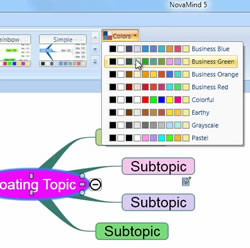 I’m convinced that the reason so many people produce black-and-white mind maps is that the process of changing topic, font and line colors on your own (outside of installed themes) can be time-consuming. Not only that, but few people except for artists really have a sense for what families of colors complement each other.
In addition to offering a selection of attractive map themes (which incorporate complementary colors), NovaMind 5 gives you another level of creative freedom with something new called “color sets” – families of 10 colors that go well together. From those are derived additional families of complementary colors, with names like “business blue,” “earthy” and “pastel.” These are displayed by clicking on the “colors” button in the map design tab. If you click in one of the rows to select a color for an object in your map, NovaMind 5 will automatically apply the rest of the colors from that set to the other objects in your map. For those of us who are color impaired, this ensures that your map will always contain colors that go together and share a similar level of contrast.
NovaMind 5 gives you a great amount of creative freedom, but constrains that just enough to help you create some very attractive mind maps, with a minimum of fuss. If you want an even greater level of control than color sets provide, you can use a separate color wheel to select custom colors and adjust the transparency to create some interesting effect – such as “ghosted” topic shapes. You can also use the red, green, blue, and alpha sliders to pick a color, or enter values in the range 0 to 255 if you know the color values you need. Very cool!
Font sets work in much the same way as color sets. If you apply a particular font face to a topic in your map, NovaMind 5 will automatically apply the same font face to the other objects in your map, to maintain a consistent look. The font size and other attributes are still derived from the map theme you’ve selected. This is another example of the deep level of thinking that has gone into NovaMind 5 – which enables you to do more, without overwhelming you.
Advanced topic shapes
NovaMind 5 contains the usual selection of ovals, rectangles and rounded rectangles for topic shapes, but it also gives you access to an advanced settings dialog box, where you can significantly modify topic shapes – altering their shape (changing the rounding of the corners or adding chamfered corners, for example), fill style, outline, boundary and layout. As with the other customization options in this program, if you get carried away, there is a convenient “return to default” button. This new version of NovaMind also gives you a gallery of shape styles, which automatically set a number of options, all at the same time, that go with the map theme you’re using.
Images and adornments
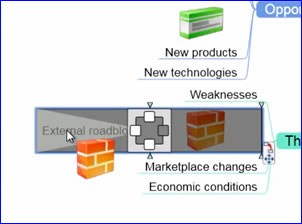 Images can be dragged on to the topics, and you can have up to four images on each topic. Just drag an image on and drop it in the quadrant you want it (the image at right shows this in action; the quadrant selector is the gray box in the middle with the smaller white boxes around it). You can resize an image by dragging the two edges that have resize handles on them, so you can adjust it in relation to the edge of the topic or relative to the text. When you first add an image, it will be scaled to fit the space that you have available for it, but if you right click the image, you will see the options for scaling it to fit the available space, or stretching it to fit the space.
This brings new possibilities for adding images to topics. For example, you could place images in the top and bottom quadrants to create a decorative framing for a topic. As I played with this capability, I found myself wondering: Why didn’t anyone else think of this first? It’s quite useful!
NovaMind takes a smart approach to its image library. The program as purchased doesn’t contain a very big image library, but you’re immediately instructed to download a much larger collection (3,000 images) separately. Why is that important? If you’re a new user and just want to experiment with the basics of NovaMind, you can do so with the default image library. When you’re ready to expand your abilities, you can easily download and install the full image library, at no extra cost. I like the way they think!
Adornments are NovaMind’s term for icons or symbols – small images that are displayed on the left side of a topic, and are used as a visual indicator of a particular meaning. You can have as many adornments on a topic as you like, and they can be dragged and dropped from the adornments library to topics, or from one topic to another.
Conclusion
NovaMind 5 gives you an unprecedented amount of creative freedom to create awesome looking mind maps, quickly and easily. It gives you many options, but thanks to excellent user interface design, it never overwhelms you. If you want to create a simple mind map, you can. But if you want to create something that makes people say “Wow!!” that is within your reach as well.
I’m very impressed with how the program seems to anticipate what you’re doing and adjust everything else accordingly. Yet you can still override all of these defaults if you want – or quickly revert to default settings if you get lost in customizing the appearance of your map. It’s the perfect blend of hand-holding for beginner and intermediate users, yet NovaMind contains enough customization options to satisfy even the most discerning power user.
If you want to see more examples of what this amazing program is capable of, I recommend that you visit the NovaMind Blog and watch Gideon King’s series of NovaMind 5 tutorial videos. I strongly recommend that you do this, because words and static pictures just can’t do justice to this very impressive mind mapping program. You can also view the NovaMind 5 features page for a complete rundown of all of its new and improved features.
NovaMind 5 Platinum for Windows is currently available for US$249; a Mac version will be available on May 12, 2010. Pro and Express versions are also available for US$149 and $49, respectively. Trial versions are also available for download here.
Leave a Reply