
 If you’re looking for a mind mapping program that will enable you to do project management – including Gantt charts – there are only four that offer this feature: MindManager Pro 7 (utilizing JCVGantt, which Mindjet recently acquired), OpenMind 2 Business Edition, MindMapper 2008 and iMindMap 3 Ultimate.
All four of these programs operate roughly the same way: You first add topics to your map, representing each of the elements of your project. Next, you add start and end dates to selected topics, which designates them as tasks. Finally, you switch to a Gantt view, and each program utilizes the start and end task dates to populate the horizontal bars for each task within the Gantt chart. Dependences are created from the relationships between parent and child topics in the mind map. In other words, a top-level topic in the map that has three sub-topics will be displayed with the top-level topic as a summary task in the Gantt view, and the three child topics as sub-tasks that are dependent upon the top-level one.
Let’s take a closer look at how each program implements this important capability:
MindManager + JCVGantt: JCVGantt 3 is integrated into the MindManager Pro 7 toolbar, making it easy to do the “front end” work of formulating your project in MindManager, and then move it over to JCVGantt. Because JCVGantt 3 is still a separate application, you can also open it separately (without MindManager) and insert tasks and dependencies into it. You can also record milestones, percentage of completion and costs for each task and sub-task, and generate total cost reports for the major segments of your project. In addition, you can customize many project management parameters in JCVGantt 3, including the currency in which costs are recorded, the length of workdays and the dates of holidays, the default duration unit used in the Gantt chart and much more. If you want the maximum amount of control over all parameters of your project and the reports you can generate from it, this is a powerful project management solution.
OpenMind 2 Business Edition: In OpenMind 2 Business Edition, you can attach detailed task information to individual map topics, including start date, end dates, priority level and resources. The program’s task/timeline Info dialog box, which you use to enter task information, contains a button at the bottom that says “enable project management.” When you click on it, the program automatically checks to make sure that any task information you have entered into your map is modified to be compliant with popular project-management software – which could save you a lot of frustration when you import your map into your project management software. You can also display your map’s task information as a GANTT chart. The OpenMind Business Gantt view lets you define and modify project scheduling data quickly and easily, including dependencies, constraints, completion values, task duration, lead/lag times, resources, priorities, critical path, milestones and warnings of scheduling conflicts. You can also generate various HTML reports such as a “Project Summary”, a “Who Does What” and a “Completed Tasks” report. Next to JCVGantt 3, OpenMind 2 Business Edition is the next most powerful project management tool.
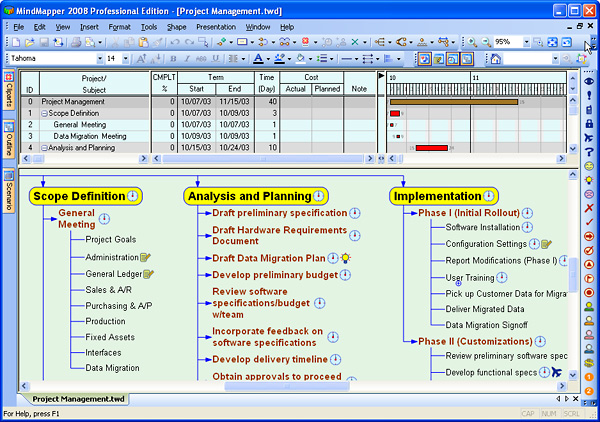
MindMapper 2008: MindMapper 2008 displays a split map/Gantt view, which includes percentage complete, start and end dates, duration, actual and planned costs, and notes. You can also define resources within MindMapper, or import them from an Excel spreadsheet. In addition, plus and minus icons in the Gantt view enable you to “roll down” (expand) and “roll up” (contract) the amount of detail shown, which may help you to manage the amount of data displayed for complex projects with numerous sub-tasks.
iMindMap 3 Ultimate: This new top-of-the-line version of iMindMap 3 enables you to track task start and end dates, milestones, durations, priorities (on a scale of 0-10) and percentage of completion for each task.
Other high-end mind mapping software programs, such as ConceptDraw MINDMAP 5, enable you to record task data on map topics, and can export to popular project management formats, but they don’t natively support a Gantt chart view.
If you liked this post, please subscribe to the RSS feed of this blog.
Leave a Reply