
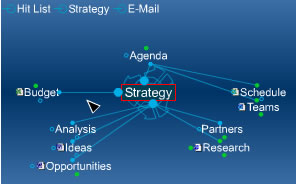
PersonalBrain v4.5 introduces enhanced visualization, searching and editing features

Jul 22nd, 2008 | By Chuck Frey | Category: Software

TheBrain Technologies has just released PersonalBrain version 4.5 as a free upgrade to existing users of PersonalBrain 4.0. This new version of the powerful visual mapping program features an enhanced database backend that now permits users to create Brain files of unlimited size, and has also been optimized for greater speed.

Enhancements in version 4.5 of PersonalBrain include:

  • Advanced search and indexing: PersonalBrain features a powerful search that lets users shift focus to anything that comes to mind in seconds. Live search results appear as users type, prioritized based on usage data. As users’ Brain files become larger and more complex, I’m sure that this enhancement will be appreciated by many people.
  • Improved distant thought view: PersonalBrain’s display engine has been enhanced to enable users to view second generation thoughts, which helps to provide them with greater context of their current location and where they can go when navigating large Brain files.
  • Merging Brains and copying thoughts: In version 4.5, users can merge the contents of one Brain into another and use sophisticated copying functions to leverage a set of thoughts and relationships in new contexts.
  • Excel and Word import and export: Information contained within Word, Excel and other applications can now be imported into PersonalBrain. Exporting your Brain’s contents into Microsoft Word only takes a few steps, and should be a boon to people who need to create complex, multi-faceted documents, such as book writers and executives preparing detailed business plans.
  • Multiple levels of undo and re-do editing: Users can now re-consider their actions when adding items to their Brains, even undoing multiple steps in one mouse click.

This program just keeps getting better and better. I can’t wait to play around with version 4.5. I hope to get my hands on a copy soon, and will let you know what I think!

[Bloglines] [del.icio.us] [Digg] [Facebook] [Furl] [Google] [Kaboodle] [Ma.gnolia] [MyWeb] [Newsvine] [Reddit] [Shoutwire] [Slashdot] [Spurl] [Squidoo] [StumbleUpon] [Technorati] [Yahoo!]
Tags: , , , , ,

5 comments
Leave a comment »

  1. I have set up a Brain to take the place of my desktop allowing me much more flexibility in accessing data that I need to get my hands on quickly. The new version 4.5 is very quick and responsive. The learning curve is short as well. I highly recommend this program for both business and personal use. It’s a great way to put your life in one place.

  2. If there is one MindMapping and personal productivity tool to watch, then this is the one! This program combines mindmapping and personal follow-up in a very intuitive way. I’m a fan!

  3. Chuck,

    Could you play around with PersonalBrain 4.5 already?
    PersonalBrain is nearly (100% perfection is not possible) the perfect application for the information and creative worker today. The possibility to cross-link a thought with any other thought in a brain gives very interesting insight on how data (pics, notes, files, tasks, projects, contacts, appointments etc.) is connected. I like the paradigm of ‘Dynamic Mind Mapping’ described by Shelley Hayduk (see here: http://blog.thebrain.com/beyond-hierarchies/). I don’t think it’s ‘better’ than convenient outlining or mind mapping, but it’s another approach.
    I still believe that outlining and conventional mind mapping are still necessary to develop clear concepts, project plans, books, papers and articles. But the process to develop a clear outline needs to be more open and messy in the beginning. An example: I need to develop a CRM concept for the company I am working for. So I started working on the concept by creating a dynamic mind map in PersonalBrain. Later, when I have collected all ideas, notes, questions, facts and figures I will streamline the dynamic map into an outline and then to a text.

  4. Dominick, I have played around with PersonalBrain 4.5, and have reviewed previous versions of it. It’s quite impressive. I like the fact that a single thought can have multiple relationships with other thoughts - it actually does a better job of mirroring the way the mind works than “conventional” mind maps can.

    You mentioned the idea of a visual map being “open and messy” in the beginning, and then re-organizing and streamlining it once you have captured all of the pertinent info. That sounds very similar to the concept of successive approximation, which I recently wrote about.

  5. Chuck,
    Many thanks for your reply and the hint to concept of successive approximation. This is very interesting.

Leave Comment