
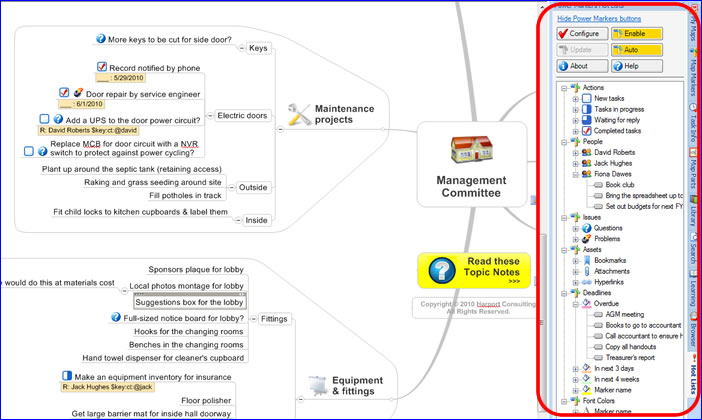
 One of the problems of large, complex project maps is it’s hard to remember where you placed a specific topic. It could be located in any one of a number of branches, buried several levels deep in your map. MindManager’s powerful filtering feature lets you search based on tasks, icons and other criteria, but when you filter your map’s contents, you lose the overall context. Power Markers 2 from Olympic Ltd. solves both of these problems in the new version of its MindManager add-in.
Power Markers 2 analyzes your map, picks out topics with common characteristics, sorts them, groups them together in lists, and displays them in MindManager’s task bar, right next to your map. or example, you can see all the unfinished actions together in one place, and click on one of them to go straight there in your mind map, even if it is buried five levels deep. Power Markers expands the branch where the topic resides, and makes it the currently-selected topic.
Power Markers 2 makes your dashboard maps immediately more useful and the information within them more accessible – especially as your maps become more complex. And it does all of this without filtering the contents of your map, which has some distinct advantages, according to Nick Duffill of Harport Consulting, who wrote a white paper about the pros and cons of dashboard maps:
“While images and color in mind maps were originally intended to assist recognition and recall, it is natural to regard topics marked with the same image or color as having something in common. For example, we can visually mark all priority 1 items with the same icon, and easily spot them in the map. MindManager also has the ability to filter the map, so that only topics containing certain markers are visible. But filtering the map… to get at a certain type of item destroys the big picture and/or the context around a topic at the same time, and if the results are spread over a large map and cannot all be seen at once, it becomes laborious to work with them as a group.”
What’s new in version 2 of Power Markers?
- Standard and Pro editions: Power Markers now comes in Standard and Pro editions.
The Standard edition does not require a license key, and is free to use. It supports up to
15 Power Markers (lists in the hot lists) per map. Pro Edition does not have this
restriction, and requires a license key to be purchased. - Hiding of completed tasks: You can now switch off the display of already-completed
tasks in the hot lists and roll-up, making it easier to focus on open action items. - Automatic markers: Special conditions on a topic can be assigned to a marker, so that
the marker can then be shown in the hot lists or rolled up in the map. You can
automatically detect hyperlinks, attachments, bookmarks, task status (unstarted,
complete, etc.), task dates and more, and Power Markers will manage automatic
map markers to let you manage your map using this information. For example, version 2
can automatically show overdue tasks in the hot list. - Active Legends: Power Markers 2 lets you define your map markers in the map,
not only in the Map Marker Task Pane. It reverses the logic of the map marker legend, by
creating the map markers from the legend, instead of creating the legend from the map
markers. This is much more flexible, and allows you to copy useful map marker groups
between maps, making it easy to set up new maps from existing ones. Power Markers can also create pointers to the Active Legend topics in the hot lists, making it easy to find important reference information in your map. - New templates: Power Markers includes a set of six template dashboard maps, so that you can get started with an already working design, or use them as the starting point for custom dashboards.
I never played around with version 1 of Power Markers, but now that I have version 2 installed in my copy of MindManager 8, I’m very impressed with what I’m seeing so far. There’s something undeniably cool about seeing the key information of your map extracted into common-sense sets of lists. It’s also neat to click on a single item in one of these lists and watching MindManager immediately jump to that item. It’s like a table of contents on steriods! P
Power Markers 2 also has the potential to make your old maps more meaningful. Duffill points out in his white paper that when you return to a mind map a year or two after you’ve created it, your mind is not in the same place as it was at the time of the map’s creation, and thus you may find it hard to recall why you organized it the way you did. He compares this to parking your car in the lot of a large shopping center, and, upon your return, forgetting where you parked it. It’s a very apt analogy, I think. Mind maps tend have a great deal of value when we’re using them, but when we return to them later, we tend to find that their relevance has diminished. By providing a set of “signposts” to important information embedded in your maps, Power Markers 2 promises to solve this problem.
Power Markers 2 is compatible with MindManager 7 and 8 for Windows. For more information on pricing and functionality, please visit the Power Markers web page.
Leave a Reply