

What if you had a context assistant, a tool that dynamically and visually helped you navigate the ever-changing context of your day, helping you connect the people, projects, priorities and details you need to be more productive?
Not a note-taking app, which captures nuggets of information in isolated containers but doesn’t help you see how they fit together.
Not a mind map, which is better at showing relationships between bits of information, but is only a static snapshot.
Something more dynamic and context-aware.
I recently had an opportunity to interview iXnote developer Stephen Peacock to learn more about the thinking behind this unique visual thinking tool, how it works and who can benefit from it.
Why does iXnote exist?
Chuck Frey: Please walk me through the beginnings of iXnote. What convinced you that a tool like this needed to exist?
Stephen Peacock: I’d be in a meeting and I’d need one buried detail, a figure, a name, a thing someone said three weeks ago, and I’d need it NOW, in this moment. Every note tool made me scroll through pages of linear notes, tons of padding, lots of repetition. I needed just one nugget, and I needed it now. So I built the thing that gives me the nugget.
Frey: Were there some problems with the existing tools you were using? If so, what problems were you running into?
Peacock: Plenty, and I want to be fair here, because I still use some of them. I was all-in on Evernote from 2008, tens of thousands of notes over about ten years, and one day I deleted the account outright. Ten years of notes, gone. And I barely missed them. That taught me something uncomfortable: I’d been hoarding.
Then came the desperate experimental years. Paper, Apple Notes, and a long, deep love affair with Obsidian. Obsidian is a wonderful tool and I learned a lot from it, but no matter how cleverly I set it up, it kept failing at scale, and in a predictable way. Wiki-links breed duplication. You type a colleague’s name into fifty different notes and now that one person is smeared across fifty places with no single home. Combine that with the chronic context bloat linear notes demand and you get what I call catastrophic note collapse. The system that was meant to hold your thinking together falls apart, and the more you write, the worse it gets. I wanted the opposite. A tool that gets better with scale, not worse.
Frey: It’s a well-documented issue with note-taking tools: people spend so much time working on and refining their systems that they don’t spend enough time nurturing their ideas. Is that what you’ve seen?
Peacock: Yes, and I’ve been that person. There’s a particular state my personality is drawn to, where the system becomes the hobby: the folders, the tags, the weekly review, the plugins. It feels like work because it is work. It’s just not productive thinking.
So I made a decision early on to take the maintenance away. No folders to keep tidy, no tags to prune, no weekly review to fall behind on. In iXnote the only thing you do is capture a small card and decide what it links to. That’s it. The linking is the thinking, and I wanted every bit of effort you spend to go into that one high-value act, not into grooming a filing cabinet you’ll abandon in March.
The thinking behind iXnote
Frey: What were your goals in designing iXnote?
Peacock: Three, really. Capture less, link more, zero maintenance. Only ever write your colleague’s name once. Link them to anything relevant (giving them context), and that’s it.
Underneath all of that is one belief: the tool should make you do as little thinking as possible, so you can do the right thinking AND listen to the actual conversation.
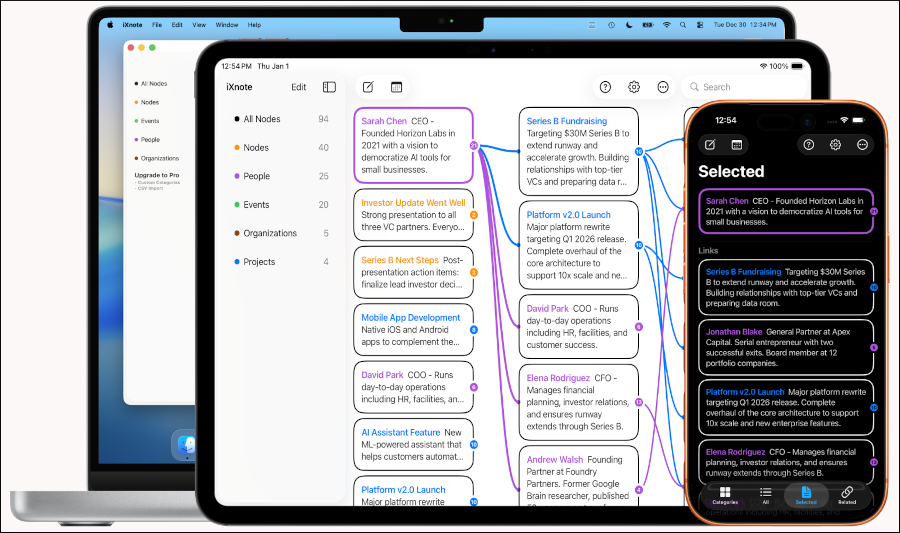
Frey: Can you walk us through the interface, how notes are arranged on screen, the meaning of each column and the role that AI plays when using iXnote?
Peacock: The iPhone UI is tab-based, fine on the go but not optimal. On a wider screen you get three columns, and the whole thing re-centres every time you tap a card.
The left is your master list, every card you have, newest first. The middle column is the first degree: the cards directly connected to whatever card you’ve selected. The right column is the second degree: the cards that are one more hop out, connected to your first-degree cards. So you never view a card out of context, and this lets you write notes without context. You read notes surrounded by their neighbours and their neighbours’ neighbours, laid out as efficient, readable columns rather than a dot-cloud diagram you have to squint at.
Despite the fact that I have spent nearly 10 years designing AI products, or perhaps because of it, AI has a deliberately narrow role. AI can help you find notes, and it will suggest notes, but it won’t help you link notes, that’s the thinking, that’s the important bit.
Frey: You emphasize that you’ve taken a minimalist approach to notes in iXnote. It’s not designed for lengthy notes or for embellishments like tagging and linking. What’s the benefit of keeping it simple?
Peacock: Small is the point, not a limitation. Each card is about the size of a tweet, one idea, a sentence or two, with the empty space taken out: you write a person, a project, an idea once, and then you link to it everywhere it’s relevant, instead of retyping it into fifty documents. That one discipline is what stops the catastrophic note collapse that is inevitable in other systems.
iXnote is simple to use but it takes a little while to get used to it. Writing small and linking well is a skill. Most people have spent their whole lives writing long, so there’s a short adjustment. It’s worth it, but it’s real.
Frey: What are the differences between first, second and third level topics?
Peacock: iXnote works in degrees of connection like a mind map. Imagine your selected card is the centre of the mind map. Its 1st degree connections are the cards you’ve linked to it directly. In a typical mind map they surround it. Its second-degree connections are one hop further out.
That 2nd degree column is where the magic happens. There actually isn’t a 3rd level, I tried it but by the 3rd degree half of any well-linked graph is visible and that’s no help.
Frey: What is the graph memory system in iXnote? How does that work? How does it assign weights to your notes?
Peacock: Weighting is how a graph with thousands of notes, or a note with hundreds of connections, does not become overwhelming. A note’s weight is dynamic, degrading, reactive to attention. Every time you select a card, you effectively upvote it, its immediate neighbours, and the edges between them, by different amounts. Over time each card accumulates a weight, each edge also, and those combine into a “relevance score” that decides sort order. So on a busy card with a hundred connections, you see the ones that matter to you based on your recent activity.
Frey: You’ve described iXnote as having “built-in forgetting.” How does that work?
Peacock: The word I’d use is fade rather than forget, because nothing is ever deleted. Cards you stop using lose weight and sink out of view. They don’t clutter the place up, they don’t demand a tidy-up, they just quietly drop below the waterline. But they’re never gone. A faded card is still there the instant you search for it, still surfaces when you type something similar, still reachable through the things it links to. Out of view is not lost.
I think this is one of the most important design choices in the whole app. Memory is supposed to forget. If you exhaustively capture everything and rank them all equally important, you’ve really captured nothing, because you can’t find the thing that matters under the mountain of things that don’t. Just as Google’s PageRank made internet search usable, better even at scale, note and connection ranking does the same in iXnote.
Frey: How does this arrangement bring an element of serendipity to the thoughts, ideas and notes you have captured in your iXnote workspace?
Peacock: Through that 2nd degree column, mostly. It shows you connections you hadn’t made, or had forgotten. You link a meeting to the people who were in it; the app shows you another project, sitting there as a second-degree connection, because it shares two of those people. You never linked the two projects directly. The graph did the joining, from links you’d already made for other reasons, and now there it is in front of you at the exact moment it’s useful.
And because old-but-relevant cards resurface when the context calls for them rather than staying buried by date, you get these small, useful triangulation collisions. You went looking for one thing and the graph handed you a second thing you’d forgotten you knew. That’s the serendipity. It falls out of the structure.

Who is iXnote for?
Frey: What types of people can benefit the most from iXnote and why?
Peacock: The fastest payoff is for people who live in meetings: sales, business development, product, anyone doing fifteen conversations a day where a detail from three weeks ago decides the next five minutes. Import a meeting, and the graph starts connecting people, projects and decisions for you.
Beyond that, researchers, students and writers who are trying to stay oriented in their own thinking. It’s for people who hate note systems but need them. If you’ve bounced off every tool because the upkeep defeated you, that’s the person I built this for. It’s a tool in your toolbox, by the way, not one tool to rule them all. I use Apple Notes every single day alongside it, and collaborate with Claude in Obsidian.
Frey: You’ve described iXnote as not for people who think by writing. Why is that?
Peacock: Because for some people the writing is the thinking. They work an idea out by drafting long prose, reordering paragraphs, rewriting, and the sheer act of writing at length is how they get to clarity. They are actually linking their thinking, sentence 1, to sentence 2, insert 1a, actually, move #1 to the end. They are creating a chain of linked ideas, a one-dimensional graph. I can’t think well like that, wish I could sometimes, but there it is.
Frey: How is the daily notes option useful?
Peacock: If you switch it on, iXnote creates a card for today automatically, and new cards you make during the day get linked to it. Over time that builds a timeline of your days without you doing anything, so you can find things the way you actually remember them: not by topic but by when. “That was the Tuesday we met the vendor.” Tap the day, and there’s everything from it. It leans on the same association-by-hopping that the rest of the app runs on.
 Frey: If you had to summarize the value of iXnote in a single sentence, how would you describe it?
Peacock: Context is all you need.
Frey: What are you hearing from users of iXnote? What are they telling you about the value it’s providing to them? What are the most intriguing stories you’re hearing?
Peacock: iXnote is privacy first, no tracking, no cost, no signup. That’s by design, so it can be used in even the most restrictive enterprise IT environments. Because of that I only know how many people have downloaded the app, that’s it. So I have almost no user stories. I get and cherish the odd email of thanks. One user was using iXnote to learn a new language, linking English and Polish words and phrases together. I would never have thought of using it like that. Another was doing genealogy research. Most are simply knowledge workers trying to manage the firehose of information that blasts at them every day.
Frey: You have described the right column as “listening” to what’s going on in the other two. How does that work and what types of information does it display? Is it doing a semantic analysis of the information and the other two columns?
Peacock: The FollowAlong view. It’s an on-device AI companion that follows a live conversation, a meeting or a lecture, and as it does it surfaces related cards from your graph, and occasionally a suggested new card. In an hour-long lecture it might make thirty or forty suggestions. It’s private, free, it works in airplane mode, and, this is the important bit, it never puts anything into your graph. It suggests; you decide. So there is real intelligence in the app, it’s just carefully fenced: it does the low-value text and surfacing, and it leaves the high-value thinking to you.
Frey: What’s next for iXnote?
Peacock: I have just released a new version with greatly extended Apple Shortcuts support. This opens the graph up to an almost unlimited world of workflow possibilities for the workflow hackers out there. I don’t have new features planned yet, so if you use iXnote and have ideas for what should be next, reach out.
Frey: Where can my readers learn more about iXnote?
The website contains the story behind iXnote and a blog where I write about the thinking behind it. The app is free on the App Store for iPhone, iPad and Mac, search iXnote. And they can reach me through the contact page on the site; I read everything.
Leave a Reply