
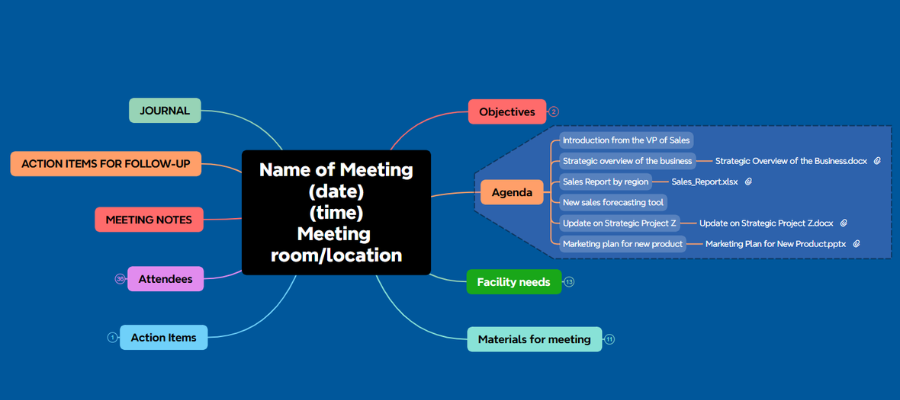
Why mind mapping software is the ultimate end-to-end tool for planning, running, and following up on high-stakes meetings — and how it can save your reputation
If you’re like most professionals, you’ve probably managed your share of meetings. Team check-ins. Project updates. Status reviews. You send out an agenda, book a conference room, and you’re good to go.
But then one day, your boss walks into your office and says, “I need you to manage next month’s board of directors meeting.” And suddenly, everything changes.
This isn’t a routine meeting. This is a complex, high-visibility event involving senior executives, multiple presentations, detailed logistics, and dozens of moving parts that all need to come together flawlessly. The kind of meeting where your reputation — and possibly your career — is on the line.
Let’s be blunt: If a board of directors meeting is poorly organized, the consequences can be severe. Executives notice when logistics fall apart, when materials aren’t ready, when presenters aren’t prepared. It reflects badly on you, on your boss, and on your entire department. In the worst case, it can damage your professional credibility in ways that take years to repair.
So what do you do? Especially if managing meetings of this complexity isn’t even part of your job description, and your department is shorthanded, and you’ve never done anything like this before?
Here’s the good news: Mind mapping software is, in my opinion, the single most powerful tool you can use to plan, manage, and follow up on a complex meeting. And I don’t just mean creating an agenda. I’m talking about an end-to-end planning and management system that enables you to effectively prepare for and structure an efficient meeting before it takes place, capture key decisions, action items, and responsibilities during the meeting, and distribute meeting minutes and task assignments after it’s over.
What makes mind mapping tools so ideally suited for this purpose? It comes down to the non-linear nature of meeting planning itself. When you’re organizing a complex meeting, your thinking doesn’t happen in neat, sequential order. You’re jumping between logistics and content, between attendee travel arrangements and presentation files, between catering and AV equipment. A mind map mirrors the way your brain actually works in these situations — and that’s a massive advantage.
Chances are, most of you have no idea just how many different ways mind mapping tools can help you manage the myriad of details that go into planning a successful meeting. In this article, I’m going to walk you through all of them. By the time you’re done reading, I think you’ll be amazed at how much of this process a single mind map can handle.
Start with the big picture: Objectives first, then the agenda
One mistake I see people make repeatedly is jumping straight into the agenda without first defining the objectives of the meeting. These are two different things, and the distinction matters.
An agenda is a lower-level description of what you want to discuss during the meeting. An objective, on the other hand, defines at a higher level what you want to accomplish. What will the key takeaway be? What decisions need to be made? In the case of a board of directors meeting, for example, your objectives might be to get a clear picture of estimated sales for the coming fiscal year and to determine whether you need to staff up for a new product launch.
By placing your objectives front and center in your mind map — as a primary branch radiating from the central topic — you create a constant visual reminder of what this meeting is ultimately about. Every other branch of your map should serve those objectives.
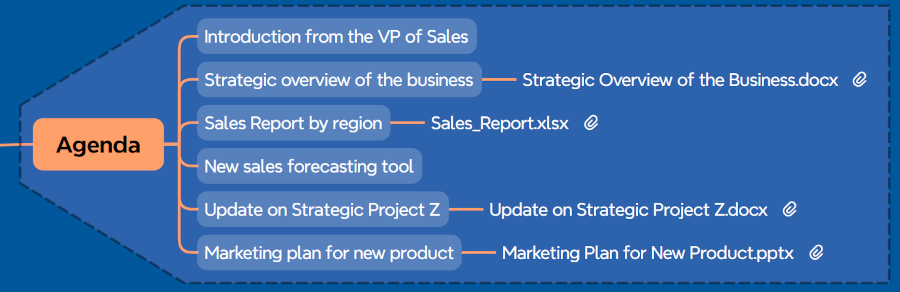
Once your objectives are clear, build out your agenda as a separate branch. For each agenda item, I strongly recommend assigning time limits. This is a technique I’ve seen work incredibly well. It sets the expectations of the attendees as to the relative importance of each topic, it helps you manage time so you’re able to cover all of the key items in the time allotted, and it helps to prevent yet another “endless” meeting. You know what I’m talking about — the meeting that drags on and on because no one can tell when it’s over.
Your mind map can also serve as a dynamic scratch pad as you develop your thinking about what the meeting should cover and how much time to allocate for each topic. Move branches around. Experiment. That’s one of the beautiful things about working visually — nothing is set in stone until you decide it is.
Managing attendees and their information
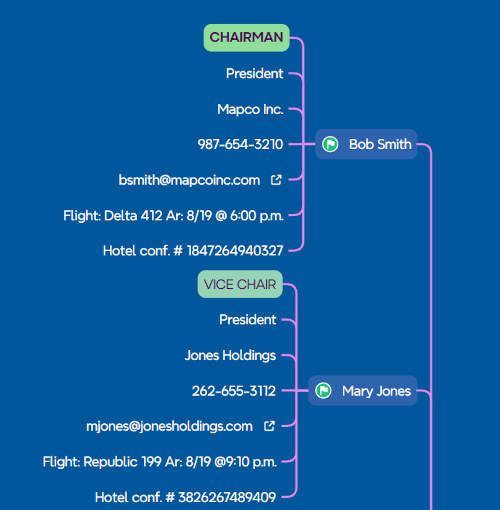 For a complex meeting like a board of directors gathering, you’re not just tracking names. You may be dealing with executives traveling from multiple regions, each with their own flight information, hotel confirmations, phone numbers, email addresses, titles, and roles.
A mind map handles this brilliantly. Create an “Attendees” branch and add a sub-branch for each person. Under each person’s name, you can capture their title and role, contact information such as phone numbers and email addresses, travel details including flight numbers, arrival times, and hotel confirmation numbers, whether they’re attending in person or remotely, and their reporting relationship within the organization.
This gives you instant access to every detail you might need at a moment’s notice. If a flight is delayed, you can immediately see who is affected and how to reach them. If someone is dialing in from a home office, you know to make sure the virtual conferencing setup is ready for them.
Here’s a technique I think is particularly clever: Use visual indicators — colored icons, for example — to differentiate between mandatory and optional attendees. Some mind mapping programs enable you to filter by these icons, which means you can quickly view just the mandatory attendees or just those who are attending virtually.
You can also record why each person has been invited to the meeting and what level of participation you expect from them. This kind of upfront thinking helps you structure the agenda more effectively and ensures that the right people are in the room for the right discussions.
The preparation branch: Setting attendees up for success
Too often, we ask people just to “show up” at meetings we schedule. This is a missed opportunity. A “Preparation” branch in your mind map is a great way to let attendees know what they need to do before they come to the meeting, as well as what to bring to it.
For a board meeting, this might include reading the minutes from the last meeting, reviewing sales reports from their region, preparing their presentations, or bringing specific documents or data. If everyone is properly prepared before they step into the meeting, it will go much more smoothly.
You can also use this branch to specify what materials need to be distributed in advance. Some meetings may require meeting folders containing handouts. Participants may also need to sign an attendance list. One of the required documents may be the minutes of the last meeting — if it’s a more structured meeting, these may need to be read at the beginning of the meeting or at least distributed in the folder so attendees can refer to them.
Facility needs and logistics: Where the details live
This is the branch where most people underestimate the complexity of meeting planning — and where a mind map really proves its worth. Think about everything you need to arrange for a complex meeting. There’s far more to it than just booking a room.
Your facility needs branch should cover the meeting room reservation itself, including who to contact for the booking and the confirmation details. It should address technology requirements such as laptops, LCD projectors, whiteboards, and screens. If participants will be using their laptops or other computing devices, the meeting arrangements need to include power strips where people can plug in their devices. If some people are participating virtually, this needs to be supported with audiovisual conferencing equipment.
Then there are the food and beverage arrangements. For a board meeting, you may need to order lunch from a catering service, arrange for coffee and soft drinks, and make sure everything arrives on time. Your mind map can include vendor contact information, phone numbers, order deadlines, and costs — all organized visually so nothing slips through the cracks.
Here’s where the mind map becomes especially powerful for offsite meetings: If you’re in charge of finding a venue, you can create multiple sub-branches in your map, one for each prospective venue, showing its space, amenities, and approximate cost. This enables you to do a side-by-side comparison right within your map. The same approach works for catering vendors — lay out the potential vendors side by side and summarize their services and offerings visually. Once you’ve made your selections, you can delete the branches for the venues and vendors that weren’t chosen. Or you can simply collapse or hide that information, keeping it available just in case you need it for future reference.
Materials for the meeting: Your master checklist
A complex meeting typically involves a significant number of documents and materials. Your mind map can serve as a comprehensive checklist, tracking the agenda document, meeting folders, sales reports or other departmental reports, organizational overviews, details on new tools or products being discussed, order forms, and any other handout material.
But it doesn’t stop there. For a meeting involving multiple presentations, you need to track which PowerPoint files need to be loaded onto the meeting room laptop and who is presenting what. A “Presentations” sub-branch can list each presenter and the status of their slide deck, giving you a single place to check that everything is accounted for.
You can even use your mind mapping software’s linking capability to attach the actual files — or shortcuts to them — directly to the relevant branches of your map. This keeps all of your supporting information close at hand, which is a huge time saver when you’re in the thick of meeting preparation.
During the meeting: Capture everything in real time
During your meeting, information is coming at you fast and furious. Decisions are being reached, items are being tabled, assignments and deadlines are being established. This is where the non-linear nature of a mind map becomes your greatest ally.
You can use a “Notes” branch to capture what’s happening in the moment — without worrying too much about how it’s organized. Just focus on getting it down. You can always add details and rearrange things after the meeting. Mind mapping tools are ideally suited to the fluid, non-linear nature of conversation and brainstorming that take place during meetings.
A technique I find particularly useful is color-coding your notes as you capture them: facts in black, questions in blue, and issues or action items in red. This simple visual differentiation helps you scan your notes quickly and identify what needs attention.
You can also use icon markers to flag different types of information. Problems can be marked with red flag icons, important facts or ideas can be flagged with exclamation points or green flags. The advantage of this approach is that some mind mapping programs enable you to filter the contents of your map based on icons, so you could view only the problem items or only the action items.
Another smart technique: Create a “parking lot” or “tabled items” branch to capture any specific topics that the team decides to postpone for future discussion. This acknowledges the idea without letting it derail the current conversation.
And don’t forget to create a “team input” branch to capture attendees’ ideas. Gathering all of these in one visible place in your map helps people feel more valued and engaged in the meeting.
After the meeting: Minutes and action items
This is where many meeting organizers drop the ball, and it’s where a mind map can deliver enormous value.
Your meeting management mind map can include a dedicated “Minutes” section, formatted so you can report the proceedings to others. This section should include meeting details such as the date, time, and location, a list of who was present, who was absent, and any other attendees, and a structured summary of each agenda item — who presented, what was discussed, what conclusions were reached, and what actions were defined.
This format is particularly useful for anyone who didn’t attend the meeting but needs to know what decisions were reached and who is responsible for each action item.
Action items: Track them, assign them, follow through
Every meeting has outcomes. Decisions get made. Action items get defined and assigned to appropriate team members. Deadlines get set. Your mind mapping software is the perfect place to keep track of these tasks, timelines, and assignments.
Record your action items as sub-branches within a dedicated section of your map. Then convert them into tasks by adding start and end dates, percentage complete, and priority indicators. Designate who is responsible for each task. When you make these assignments visible in the map during the meeting, participants can see what they’re responsible for and what they have agreed to do — which dramatically increases accountability.
If your meetings generate a lot of tasks, this visual approach to tracking “who has what” can also help you with task allocation, so you’re not burdening one team member with too many tasks while others have too little to do.
If one task needs to be completed before another can begin, use your program to define the dependencies between them. Many mind mapping programs support this. If yours doesn’t, you can accomplish the same thing using relationship lines between branches.
The journal: Your meeting memory bank
Here’s a feature that I think is underutilized: a “Journal” branch that serves as a repository over time. This can function in several powerful ways.
First, it can serve as a meeting minute repository. If you manage recurring meetings — committee meetings, monthly board reviews, quarterly planning sessions — you can use the journal to store links to all of your past meeting minutes. I used to work for a trade association where finding past minutes was always a headache. They were buried deep in a hierarchy of nested folders on the organization’s network. A mind map can house shortcuts to all of your past minutes, eliminating that wasted time.
Second, you can use the journal as a personal notes area — a place to store your ideas, observations, and items you want to revisit in the future. Keep the branch collapsed most of the time, but feel confident that a wealth of supporting information is just one click away.
Third, if you have documents or resources you need to access periodically for your meetings, this is a great place to store shortcuts to them. They don’t clutter your main map, but you can access them quickly when you need them.
Putting it all together
Let me bring this back to where we started. Imagine you’re staring at the task of managing your company’s next board of directors meeting. You’ve never managed a meeting of this complexity before, and you know there’s a lot riding on it being a success.
Instead of drowning in scattered to-do lists, email threads, and spreadsheets, you open your mind mapping software and create a single, comprehensive meeting management map. At the center is the meeting itself — its name, date, time, and location. Radiating outward are branches for objectives, agenda, attendees, facility needs, materials, preparation requirements, and action items.
As you build out each branch, something remarkable happens: The complexity that felt overwhelming starts to become manageable. You can see the entire meeting ecosystem in one view. You can drill into any branch for details. You can spot gaps and dependencies. You can share relevant branches with colleagues who are helping you prepare.
This is the power of visual thinking applied to one of the most common and most underestimated challenges in business. A mind map doesn’t just help you organize a meeting. It helps you think through every dimension of it, from the highest-level objectives to the smallest logistical detail.
And when that board meeting runs smoothly — when every presentation is loaded, every attendee is prepared, every document is in the right folder, and every action item is captured and assigned — you’ll know exactly why. You could see it all, right there in your map.
That’s the visual velocity advantage.
Get the meeting management template
If you’re facing a scenario like I’ve just described, you don’t need to spend hours building the mind map I just described. You can use my new Meeting Management mind map template to organize all the details of your next important meeting.
Order the template for immediate download (Xmind format)
Leave a Reply