
It’s a Saturday morning. You’ve blocked two uninterrupted hours to finally map out that project you’ve been carrying around in your head all week. You open your mind mapping tool. The blank central node blinks at you. You type your topic and then, almost without thinking, you start adjusting.
The default branch color doesn’t feel quite right for this kind of work. You pull up the color picker. Then you realize the font is a bit small. You fix that. Then you notice you haven’t set up a template for this type of map — you really should, because you’re going to be doing more of these.
Forty-five minutes later, your map has a beautiful central node, perfect branch colors, a custom template saved, and exactly three ideas on it. The two hours are gone. You haven’t done the actual thinking you sat down to do.
Sound familiar?
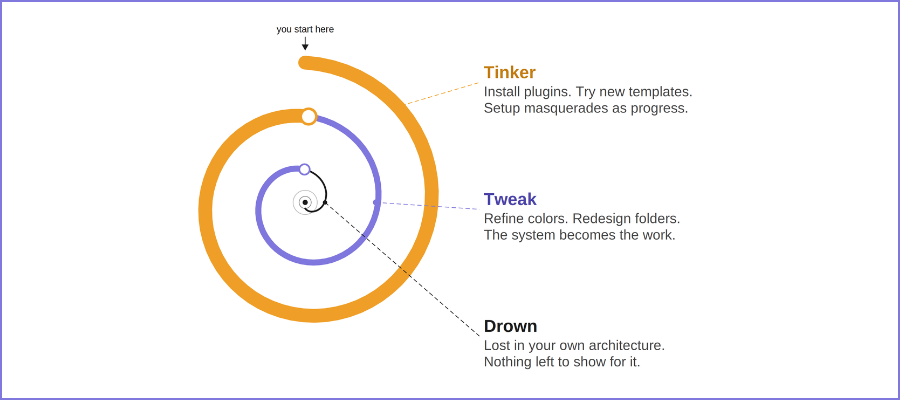
If it does, you may have already slipped into what’s become known in the productivity world as the tinker-tweak-drown spiral — a pattern that’s eating the hours of smart, earnest knowledge workers who genuinely want to be more productive, and genuinely believe they’re on their way to getting there.
I came across this concept for the first time while doing audience research for this blog. I was digging into the struggles that PKM (personal knowledge management) enthusiasts write about online, and I kept running into variations of the same story: someone describes building a beautifully architected note-taking system, only to eventually abandon it — exhausted, disoriented, and no clearer on their thinking than when they started. The name that keeps getting attached to this experience is as simple as it is accurate: tinker, then tweak, then drown.
I hadn’t heard the phrase before, but I recognized the pattern immediately. After nearly two decades of writing about mind mapping software and watching how people use — and misuse — visual thinking tools, I’ve seen this spiral play out again and again. And I’ve come to believe that it hits mind mapping users in ways that are subtly different, and often harder to recognize, than it does people using text-based tools.
What is the tinker-tweak-drown spiral?
The spiral has a deceptively innocent origin. You adopt a new tool — or you rediscover an old one — and it feels like a fresh start. Everything is clean and configurable. The possibilities feel limitless. You’re not just setting up a tool; you’re designing a system that perfectly matches the way your mind works. This initial phase feels great, and it should: clarity of intention combined with the novelty of a new workspace is genuinely energizing.
But then the tinkering begins. You add a plugin. You rearrange a template. You research best practices on YouTube and decide your folder structure needs a complete rethink. Each individual change feels justified — and it is, on its own terms. But what’s happening beneath the surface is that the tool itself is becoming the project. Your attention has shifted, almost imperceptibly, from the work you wanted to do to the infrastructure you’re building to support it.
The tweaking phase deepens this. You’re no longer making structural changes — you’re refining. You adjust colors. You optimize a workflow. You spend an evening finding exactly the right tag taxonomy. This phase is particularly insidious because it genuinely resembles productive work. You’re engaged, you’re making decisions, your system is getting more polished by the hour. But when you step back, you realize you haven’t produced anything useful in days. You’ve been maintaining an engine without ever driving the car.
And then you drown. The system has become so complex, so layered with customization, that navigating it has become a cognitive burden. You can’t find the note you captured last Tuesday. You’ve forgotten entire threads of ideas that lived in a corner of the tool you stopped visiting. The beautiful architecture you built turns out to be a maze you designed so well that even you can’t find the exit. At this point, many people do one of two things: they start over with a new tool (and the spiral begins again) or they quietly abandon the whole enterprise and go back to sticky notes and email drafts.
The symptoms of the spiral
Whether you recognize yourself in the full trajectory or you’re somewhere in the middle of it, the tinker-tweak-drown spiral leaves recognizable traces. The most common symptom is what I’d call productive-feeling paralysis: you’re clearly busy in your tool, but when someone asks what you’ve been working on, you struggle to point to anything concrete. Your activity has been about the system, not about thinking.
A second symptom is what I think of as the re-setup reflex. Instead of using your current system, you feel the pull to rebuild it. Something isn’t quite right — maybe the structure feels wrong, or a new feature just came out, or you saw someone else’s setup and yours now looks inadequate by comparison. The re-setup reflex is a way of perpetually arriving at the starting line while never actually running the race.
There’s also capture without recall: you’ve faithfully logged ideas, notes, and insights into your tool, but almost never retrieve them. Your system has grown into a write-only archive rather than an active thinking partner. You know things are in there; you just can’t find them when you need them. And because you rarely encounter what you’ve already captured, you sometimes capture the same insight twice — or spend time developing an idea you’d already developed months ago.
Finally, there’s tool fatigue disguised as tool failure. When the spiral reaches its endpoint, many people conclude that the tool simply wasn’t good enough. They go searching for the next one. But what they’re actually experiencing is the exhaustion of maintaining a system that grew beyond the purpose it was built to serve. The tool didn’t fail them. The approach did.
Why the spiral started in text-based PKM tools
The tinker-tweak-drown spiral is, at its heart, a product of infinite configurability — and no software category has historically offered more of that than text-based PKM tools. Apps like Obsidian, Notion, Roam Research, and their cousins are, by design, nearly blank canvases. They give you the building blocks and step back. How you organize your notes, what naming conventions you use, whether you structure things hierarchically or by backlinks or by tags or by some personal combination of all three — that’s entirely up to you.
This freedom is their greatest selling point. It’s also the source of the problem. When a tool offers unlimited structural flexibility, it implicitly asks you to become an architect before you become a thinker. And architecture is endlessly optimizable. There is always a better folder structure, a cleaner template, a more elegant way to link your notes together. The optimization work never concludes, because the criteria for “better” are entirely self-defined and therefore entirely self-moving.
What makes this especially difficult to resist is that this kind of configuration work genuinely feels like thinking. You’re making decisions. You’re drawing distinctions. You’re building something that represents how your mind works. The problem is that it’s thinking about thinking rather than thinking about your work. It’s metacognitive labor that produces a well-organized container rather than well-developed ideas.
How the spiral hits differently with mind mapping tools
Here’s what I’ve come to believe after years of watching mind mapping users: the spiral doesn’t disappear when you switch from text-based tools to visual ones. It shapeshifts. And in some ways, the visual dimension makes it harder to detect.
The first reason is what I call the completeness illusion. A well-designed mind map looks finished in a way that a half-organized Notion database simply doesn’t. When you’ve spent time making your branches colorful, your icons consistent, and your layout balanced, the map has a visual coherence that registers as “done” — even if the thinking it represents is shallow or incomplete. Text-based tools tend to look like work-in-progress by default. A visual tool can look polished even when it’s mostly decoration.
The second reason is the visual feedback loop. Mind mapping software is inherently rewarding to tinker with because the effects of your changes are immediate and satisfying. Switching a branch color, adding an icon, reorganizing a cluster of topics — each of these produces an instant visual payoff. This is genuinely useful when it’s in service of sense-making. But it can also become a reward loop that operates independently of any actual insight being developed. You feel productive because you can see yourself working. The map is getting more beautiful. The problem is that beauty and usefulness aren’t the same thing.
Third, there’s a phenomenon I’d describe as structure before substance. Many mind mapping users — especially newer ones — spend enormous amounts of time crafting the perfect framework for a map before they’ve added any meaningful content to it. They research templates. They set up branches and sub-branches. They establish a color-coding system. All of this is done in anticipation of the thinking they’re going to do, rather than in service of thinking that’s already happening. The scaffolding gets built before there’s a building to support.
And finally, there’s the template trap. The template libraries built into many mind mapping tools — and the thriving communities that share custom templates online — make it dangerously easy to spend an afternoon evaluating other people’s architectures instead of building your own thinking. Templates are genuinely valuable starting points. But they can also become rabbit holes that swallow hours without producing a single original thought.
Here’s a detailed comparison of the ways in which the tinker-tweak-drown spiral shows up in mind mapping and PKM (personal knowledge management):
Can the F.A.S.T mind mapping framework help?
When I look at the tinker-tweak-drown spiral through the lens of my F.A.S.T. framework for effective mind mapping, I see something interesting: each of the four phases of F.A.S.T. — Foundation, Associate, Synthesize, and Transform — serves as a direct antidote to a different dimension of the spiral. The framework isn’t just a productivity system. When applied with discipline, it’s a structural defense against getting lost in your own tool.
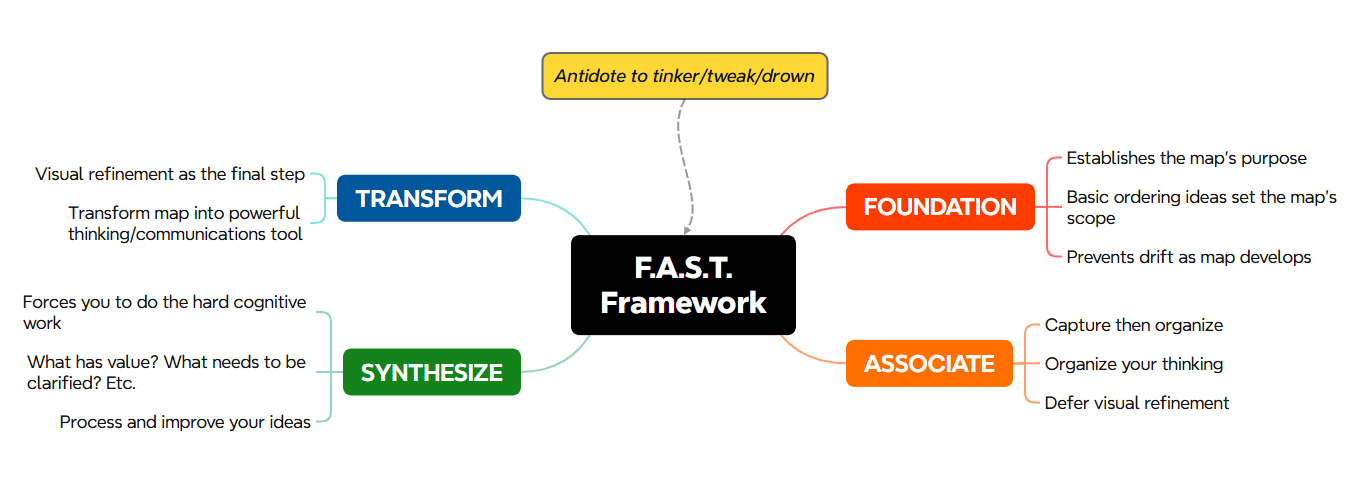
Foundation is the natural starting point for fighting the spiral, because it forces you to ask the right question first: What is the objective of this mind map? Before you touch a color palette, before you choose a template, before you configure anything — what are you trying to achieve? Foundation is about establishing your Basic Ordering Ideas: the first-level branches that define the scope and shape of your thinking. When you do this work first, you’re anchoring the entire map to a purpose. You’re creating a mental contract with yourself that says, “This is what this map is for.” That clarity is the single most effective antidote to the setup drift that characterizes the early stages of the spiral.
Associate is where the thinking actually happens — and it’s where most tinkerers never fully arrive, because the Foundation phase keeps expanding. Associate is about populating your map: capturing what you know, noting what you don’t know, making connections, following threads of association wherever they lead. The discipline of Associate is the discipline of capture first, format later. Your job in this phase isn’t to make the map look good. It’s to make the map useful. Giving yourself explicit permission to defer visual refinement until after you’ve done your real thinking is a powerful circuit-breaker for the tweaking loop.
Synthesize — what I sometimes call the sense-making phase — is perhaps the most undervalued step in the entire framework. Most people are reasonably good at capturing information and reasonably comfortable with formatting it. But the hard cognitive work of asking “What does this mean? What connects to what? What should I eliminate? What needs to be said more clearly?” is where many people stall. Synthesize is the antidote to the capture-without-recall problem. It ensures that what you put into your map actually gets processed — that it doesn’t become just another item in an archive you’ll never visit again.
And then there’s Transform — the phase where you add visual richness: connections between related branches, icons and images that reinforce meaning, color-coding that directs attention to the most important parts of the map. This is genuinely important work. Visual enrichment turns a functional map into a powerful thinking and communication tool. But here’s the critical insight: Transform comes last. It’s the reward for having done the foundational work, not the warm-up act. When mind mapping users apply visual enrichment early — before they’ve clarified their objective, populated their ideas, and synthesized their thinking — they’re essentially tinkering. They’re doing Transform before Foundation, which is how the spiral starts.
Taken together, F.A.S.T. does something that most productivity advice about tools doesn’t: it gives you a sequence. Not just a set of best practices, but an ordered process that keeps your attention on the right thing at the right time. The spiral thrives in environments of unstructured freedom. F.A.S.T. provides just enough structure to keep the thinking moving forward — without becoming another system to configure and optimize.
A final thought
I’ve spent a long time being fascinated by the gap between what mind mapping software promises and what it actually delivers for most people. The tools have never been better. The feature sets have never been richer. And yet the tinker-tweak-drown spiral persists, because the problem was never really about the tools. It was about the absence of a framework for using them.
The most productive mind mappers I know aren’t the ones with the most elaborate color-coding systems or the most meticulously curated template libraries. They’re the ones who start with a clear question, fill the map with honest thinking, wrestle with what it means, and only then ask how to make it clearer and more communicative. They treat the tool as an extension of their thinking — not as a project unto itself.
That distinction — tool as extension vs. tool as project — is, I think, at the heart of everything. When your mind mapping software becomes the thing you’re working on, you’ve already started to drown. The way out is to return to the purpose you opened it for in the first place: to think.
Ready to build a more purposeful mind mapping practice? My F.A.S.T. Framework e-course walks you through the entire process — Foundation through Transform — with concrete examples and techniques you can apply immediately.
Leave a Reply