

Strategic planning can be elevated and streamlined by capturing your team’s research and ideas within a mind map. But you can accomplish even more by placing it within a flexible visual canvas, where it can be integrated with other views and tools. In this way, it becomes a dashboard for program execution and management, too. This article is an example of how the visual collaboration tool Miro makes this possible.
Your launch plan has 40 moving parts, six teams and one mind map that stopped making sense around branch twelve.
You’ve probably lived this. On Monday, the map looks clean. By Friday, it’s a tangle. Nobody can tell which branch matters most, who owns it, or what it depends on. The real plan moves to a spreadsheet, and the map goes quiet.
Mind mapping for strategic planning works when the map carries more than ideas. Add relationships between branches, short labels for priority and owner, and color that means something. Then let Miro AI draft the first structure, so you spend your time on decisions instead of setup.
This guide shows you how to build that kind of map for product launches, portfolios, and stakeholder plans. You bring the strategy. We’ll bring the structure.
Why basic mind maps break under real strategy work
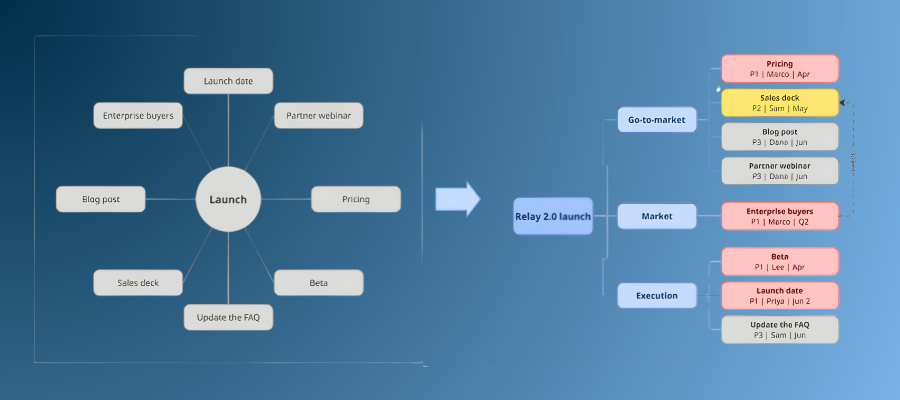
Here’s the catch with most mind maps: they show what you’re thinking about, not what to do first.
That works for a brainstorm. It fails for strategy, where you juggle several time horizons, weigh trade-offs, and track dependencies across teams. A basic hub-and-spoke map treats “launch date” and “update the FAQ” as equals.
An enterprise-grade mind map closes that gap. It still starts with a central idea and branches. It also gives you four things a basic map can’t:
- Flexible structure: Branches, sub-branches, and linked concepts that grow as the plan does.
- Visible relationships: Links, arrows, and groupings that show how one idea affects another.
- Clear labels: Priority, owner, status, and risk level, right where people read the map.
- Built-in teamwork: Comments and voting, so the people doing the work can shape the plan.
That last one matters more than it sounds. Forrester Consulting surveyed 170 engineering, product, and design leaders for its 2025 study “Collaboration is AI’s Biggest Opportunity.” Of those leaders, 95% called visual collaboration platforms important or critical to collaboration.
(click on image for larger version)

Skip the blank canvas: Start with an AI-generated strategy map
The first hour of most planning sessions goes to staring at an empty board.
Miro, the collaboration and context layer for the AI era, gives you a way around it. Its Intelligent Canvas™ puts AI, your team’s thinking, and your research on one board. Start with Miro’s AI Mind Map tool, choose Diagram, pick Mind Map, and describe what you’re planning. Our AI features include starting points for strategic planning, strategy, problem analysis, user needs, and concept exploration, so your first draft already has shape.
For a product launch, a first prompt can look like this:
Create a mind map for the Q2 launch of [product name]. Include goals, market and customers, go-to-market, risks, and execution.
You get your product or initiative in the center and five first-level branches around it. That’s a real starting point, and it took one sentence.
Now comes the human part. Miro AI drafts the structure. It doesn’t know your market, your constraints, or the risk that keeps your VP up at night. You do. Rename branches, delete what doesn’t fit, and add context only your team has. If a branch looks thin, use Expand with questions, Expand with ideas, or Expand with topics to push it further.
Want a head start? Try the Mind Map AI Template, the Business Plan Mind Map Template, or the Project Planning Mind Map.
Turn a pretty map into a planning model
Your map can’t tell you that enterprise buyers mean a longer sales cycle. You have to draw that connection.
Use node linking to show dependencies between ideas. Link “Enterprise buyers” to “Longer sales cycle” and “Enablement content.” Now anyone reading the map sees the trade-off. Cut enablement content, and the enterprise motion slows down.
Then add the labels planning needs. Keep node text short. Add priority, owner, and timeframe in a format your team agrees on, like “P1 | Priya | Q2.” Want to sort or filter by those labels? Turn the branch into a Table.
(click on image for larger version)

Color does a lot of the work. Use it for priority: red for P1, yellow for P2, gray for P3. Add a second signal for the type of work or the risk level, such as a tag on a sticky note next to the node. Write the code down in a small legend on the board, so nobody guesses.
Large maps stay scannable if you use the tools built for that. Auto layout is on by default, so child nodes realign when you move a parent. Collapse branches nobody needs right now, and a number shows how many nodes and comments hide inside. Save long explanations for a comment or a doc, and keep branch text to a few words.
From scattered research to a map your team can edit
Strategy usually starts in a mess: interview transcripts in one tab, support tickets in another, analytics in a third.
Miro’s MCP server connects that mess to your board. MCP, short for Model Context Protocol, lets AI tools you already use, like Claude, Cursor, or Copilot, read from and write to your Miro boards. You prompt in your AI tool. The results land on a canvas your team can edit, comment on, and vote on.
Charles Bédard-Porter, lead product manager for Miro’s MCP server, describes a workflow that fits strategic planning. He points Claude at customer interviews, support tickets, and usage data, then gets a summary back in Miro as a doc, a table, or a quick deck. His team talks it through and picks priorities together. He estimates the workflow saves him about 10 hours a week.
Another common pattern starts with Jira. Pull tickets onto a board and discuss them as a team. After the meeting, have Claude push the updated tickets back to Jira, Asana, or Azure DevOps.
Now picture that workflow with your own research. Your AI tool pulls interview transcripts and support tickets onto a board and clusters the pain points. It flags three big opportunity areas. Each cluster becomes a top-level branch in your strategy map, and your team extends those branches into goals, initiatives, and risks. The AI finds patterns. Your team decides which ones to bet on.
Two honest notes before you try it. First, vague prompts waste effort, so link the exact frame or doc you want your AI tool to read. Second, every Miro plan includes MCP access, and on Enterprise plans, admins decide who can use it.
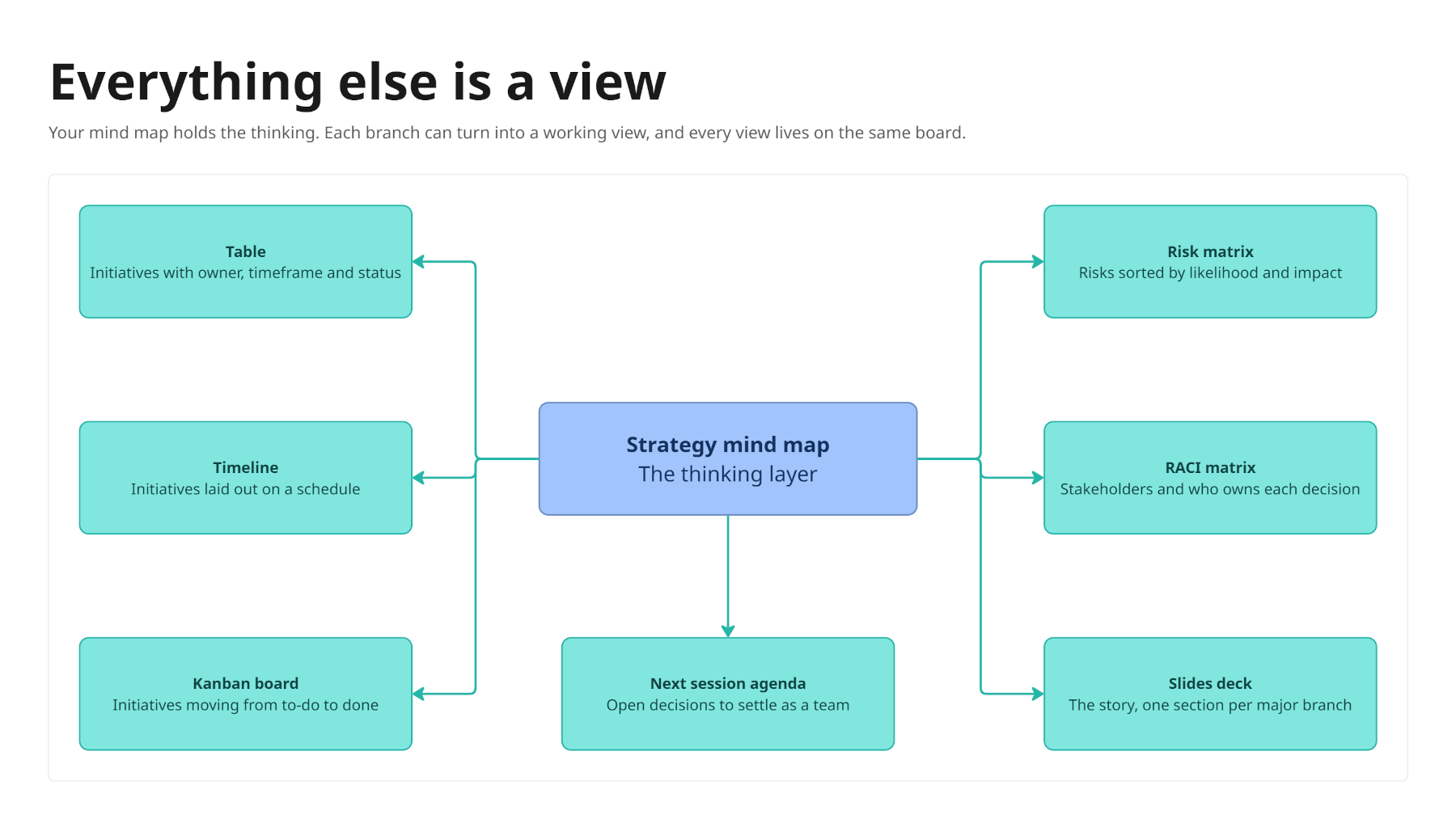
Your mind map is the thinking layer. Everything else is a view.
The map isn’t your deliverable. The plan is.
Once your branches hold up, each one can become something your team acts on:
- Initiatives become a Table, Timeline, or Kanban board. Start with the Roadmap Template.
- Risks get their own section on the board. The Risk Matrix Template gives you a head start.
- Stakeholders become a communication plan or a RACI Matrix.
- Decisions become the agenda for your next planning session.
- The story becomes a Slides deck, with each major branch as a section.
(click on image to view a larger version)
To get there fast, select a branch, open Create with AI, and ask for a table with the columns you need: owner, timeframe, status. Create with AI uses the content you select as context. Sidekicks can help too. The Roadmap Strategist Sidekick, for example, uses your company insights to suggest roadmap ideas.
The map stays in your thinking layer. The table, the timeline, and the deck are different views of the same decisions, and they all live on one board.
(click on image for larger version)

Keep a 20-person map from turning into a free-for-all
Cross-functional maps fail for a boring reason: everyone edits everything.
Miro supports both real-time and async work, so your team can co-edit in a live session or contribute on their own schedule. Comments and sticky notes let people in other time zones add input without a meeting. Voting helps you rank branches and initiatives. A recorded TalkTrack walks teammates through the map when they can’t join live.
Add three guardrails, and the map stays usable:
- Set ownership rules. Branch owners restructure their branches. Everyone else adds ideas as sticky notes or comments. Back it up with board permissions.
- Schedule tidy-up passes. Spend 15 minutes each week on auto layout and collapsed branches.
- Snapshot your decisions. Duplicate the board or frame before a big change, and add the date to its name.
Walkthrough: A product launch map in five steps

Here’s the whole workflow on one launch.
- Generate the draft. Open Create with AI, choose Diagram, then Mind Map, and pick the strategic planning starting point. Use the prompt from earlier.
- Pull in your research. Use an MCP workflow to bring interviews, tickets, and notes onto the board. Cluster the pain points and attach the clusters under a “Customer insights” branch.
- Connect and label. Link goals to initiatives and risks. Add priority and owner labels, and color each node by priority.
- Fill the gaps. Ask Miro AI what’s missing from the launch plan. Common misses include enablement, measurement, and post-launch learnings. Add the branches your team agrees on.
- Convert. Move prioritized initiatives into a Timeline or roadmap, risks into a risk matrix, and the whole story into a Slides deck.
Plan one working session for steps 3 and 4. That’s the strategic thinking, so keep your people in the room. Steps 1, 2, and 5 move faster when AI does the heavy lifting.
Spend your time on strategy, not setup
Moving from basic spokes to a richer strategy map helps your team reason about complexity without losing clarity. Relationships show the trade-offs. Labels show who owns what. Color and collapsed branches keep a big map readable.
AI and MCP don’t replace your strategic thinking. They remove the friction of structuring, mapping, and updating complex information, so you can focus on the calls only your team can make.
Ready to try it? Open a free Miro board, pick the strategic planning option in Create with AI, and map your next launch. Prefer a head start? Grab the Mind Map AI Template and start collaborating today.
View a video recap
Key takeaways
- Build a strategy map that carries more than ideas. Add links between branches, short labels for priority and owner, and color that means something. Then let Miro AI draft the first structure, so your team spends its time on decisions instead of setup.
- Pull your research onto the map. Charles Bédard-Porter, lead product manager for Miro’s MCP server, points Claude at interviews, support tickets, and usage data, then gets a summary back in Miro. He estimates it saves him about 10 hours a week.
- Treat the map as your thinking layer. Branches become tables, timelines, risk sections, and slides. Ownership rules, comments, and voting keep a cross-functional map usable as it grows.
Visit the Miro board
View the full board in read-only mode
Leave a Reply