
 One of the perils of the modern condition is mental clutter. During a typical business day, we think about so many things that it actually drains us mentally.
What if you could capture all of the ideas, to dos and commitments that are floating around in your head, clogging up your “mental RAM?” That’s the principle behind David Allen’s popular Getting Things Done (GTD) methodology, which teaches you how to empty your in-box and implement a closed-loop system to manage “next actions.” The result, ideally, is less stress and an almost zenlike level of efficiency.
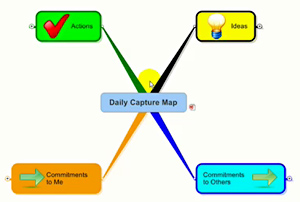
Michael Tipper, author of the new Business Profit Productivity Blueprint e-course, explains how to create a daily capture mind map – the digital equivalent of Allen’s GTD methodology. It is a simple mind map, with 4 main topics:
- Actions
- Ideas
- Commitments to me
- Commitments to others
The ideas topic, for example, gives you a place to capture your ideas while you’re busy working on other things. As Michael points out in his daily capture map video training session, this enables you to come back to the idea later, add more detail to it or copy and paste it into another map. Most importantly, he says, this process frees up your mind so it doesn’t have to continually say, “What was that idea again?”Likewise, the actions topic gives you a holding place for any tasks that you think of throughout your work day.
Commitments to others is where you capture anything that you have promised to do for your colleagues, coworkers, clients and other important stakeholders. Finally, commitments to me is where you keep track of the things that other people owe you. If the number of sub-topics you’ve captured becomes too large, you can always break off those items into a linked sub-map. It’s very easy to manage.
What do you do with all of this information after you’ve captured it? Michael recommends that you review your capture map as part of your weekly review process. At that time, you can transfer topics to the appropriate maps.
I have used mind mapping software to maintain a to-do list, but Michael takes it to a whole new level with this daily capture map. I love how he segments the different types of tasks that most of us must manage each day. Of course, if you think your situation is different and you need to capture other types of follow-ups, then you can create topics to manage them as well.
You can learn more about how to work with daily capture maps and other types of business maps in Michael’s excellent Business Profit Productivity Blueprint e-course, which I highly recommend.
Leave a Reply