
 In my previous job as member communications manager for a trade association, one of my duties was to produce its monthly member e-newsletter. This publication consisted of 20-30 single-paragraph updates on the latest programs, services and strategic initiatives the association was working on for its corporate members.
My co-workers supplied much of the raw material for this publication, with the rest coming from news releases and other documents and reports. My job was to solicit these updates from the staff, edit them to follow a common editorial style and “voice,” produce the newsletter and e-mail it to the association’s 800+ members on the tenth of every month.
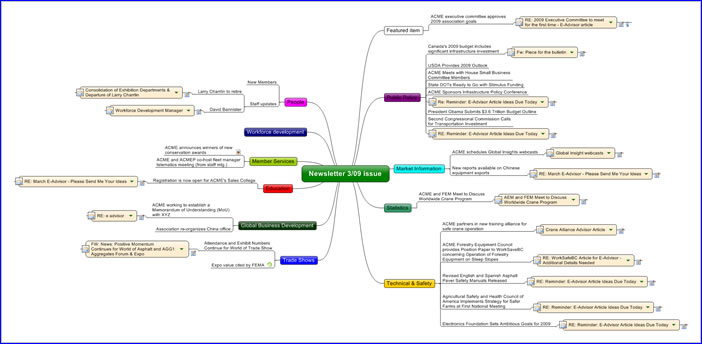
As you can imagine, this was a large quantity of content to keep track of, so I created a mind map in MindManager 8 to help me with the newsletter production process. Its ability to link to many different types of content was critical to making this work (please click on the image above to view the entire map – names have been genericized so I don’t get in trouble with my former employer for sharing this map).
Here are the steps I followed to produce this map:
- I created a mind map with the newsletter issue date in the center.
- I added sub-topics for each major section of the newsletter, which corresponded with the general categories of the services the association offered to its members.
- Next, to each of these main topics, I added the headlines or topics that would be featured in that month’s issue of the newsletter. Using MindManager’s “resources” capability, I created abbreviations based on each manager’s initials, so I could quickly tell which person in a department submitted each article idea to me. This came in useful when I needed to verify article details with them, because it removed any guesswork about who I needed to follow-up with.
- As the articles began to arrive – usually in the form of e-mail messages, but also in documents, I created sub-topics for each article, along with file, web or e-mail links to connect my map to the location of the content for each article. MindManager’s ability to link to individual Outlook e-mail messages was a big plus in this application!
- Once I catalogued all of the content I received from my coworkers, I would do a high-level review of the articles that would be in this issue of the newsletter. This visual format made it easy for me to see where I needed more content, and provided me with the information I needed to follow up with specific managers to obtain their program updates.
- The finalized topic map was then used to generate a list of topics for review and approval by the association’s senior management team. Once that was done, I used the map as a powerful set of shortcuts to locate the source material for each article, which I then copied and pasted into a Word document, and edited to suit the style of the e-newsletter. If not for this mind map, it would have taken me much longer to gather all of this material.
I estimate that using this methodology saved me 4-5 hours per month!
Lessons learned
What can you learn from my experience? Here are a few lessons for your consideration:
- Mind mapping software is an amazing “front end” research tool, because you can utilize it to organize the information you have gathered during the research phase of your project.
- The ability to link to individual e-mail messages is essential, because a significant percentage of the information and knowledge we encounter in our jobs arrives in the form of e-mail messages.
- When it comes time to write, your mind map can serve as a powerful set of shortcuts or bookmarks that can give you one-click access to the source material for your article, book or report. There’s a big potential for time savings here compared to searching your e-mail archives or the files on your hard drive for that one key piece of content!
- Using call-outs is an excellent way to leave yourself reminders of follow-ups that you must not forget about!
If anyone has any other insights to share about managing complex writing projects using mind mapping software, please share them in the comments section. Thanks!
Leave a Reply