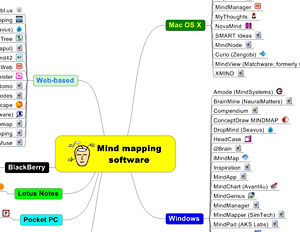
A comprehensive mind map of mind mapping software

Aug 12th, 2009 | By Chuck Frey | Category: Resources

mindmap, mind map, visual map, mind mappingOne of the most frequent questions I get from readers of this blog has to do with which programs they should consider for their needs. Part of the problem is that there are so many applications available on so many computing platforms that it’s hard to keep them all straight – or even to know what the total universe of visual mapping applications looks like.

So I decided to create a mind map of commercially available mind mapping software. Please click on the image at right to display a separate web page that includes links to all of these programs. The medium is the message, as they say!

A couple of caveats: I decided to exclude open source software, because this blog is focused upon the needs of business users – and many of the open-source programs are difficult to install and don’t provide the kind of ease of use that busy executives require. I also didn’t include all of the add-in programs that are available for MindManager and other mind mapping programs, because it would have added a lot of detail to this map. Perhaps that’s a project for a future day!

I welcome your input. If I’ve missed any applications that you’re aware of, please let me know!

Updated 8/13/09 to include open source software

Popularity: 17% [?]

Tags: , ,

28 comments
Leave a comment »

  1. Excluding open source solutions is a curious choice – but even more so the reason you gave. I use free mind as my main mapping tool; installation is no issue at all, have had no stability problems at all.

  2. I recommend FreeMind (http://freemind.sourceforge.net) an open-source solution which is easy to install and use. This software is developed and used by many people for few years. Is as stable as the platform you run it on, and it runs on Windows, Linux and Mac OS X.

  3. By far Free mind is the best of them all, is light and cross plataform. And open source it also works very well with C-maps an open source project from florida university, usin both toghether and some basic HTML you can create powerful maps and displays and manage ton of information, i have one mindmap with all my PhD work. including tables and images. No instalation issues either.

  4. I cringed when I saw that you excluded open source software. How can you claim a list is comprehensive when you’ve arbitrarily excluded some of the most popular options?

  5. Thanks for compiling this useful list.

    However – and although I’m not always a great fan of open source software – I have to agree with the other comments about the omission of Freemind. Although I prefer and use MindManager, Freemind is at least as good as many of the programs you listed.

    Also, whilst I use and like Amode, one thing I wouldn’t call it is a mind mapping program. Indeed its creators (who are also Australian distributors for MindManager) regard Amode as a unique knowledge/information/project management system, judging from correspondence I’ve had with them.

  6. Yes, I’d definitely drop Amind and add Freemind, which is good and portable enough for many applications.
    I would add a branch to hold the cross platform products.

  7. Life’s a bit too short to weed thru 60 mind mapping applications, no? Why not select the one that Chuck used to create his list, MindManager 8 :)

    Seriously though, great list. Thanks for sharing Chuck!

  8. OK, I have just updated and uploaded a revised map that does include FreeMind, along with a selection of other mind mapping applications gleaned from Vic Gee’s excellent mind mapping software list here: http://www.mind-mapping.org/.

  9. What about SmartDraw? As you know, SmartDraw has a robust mindmapping part to its versatile software.

  10. The supreme leader of the visual mapping arena remains and shall remain to be Mindjet MindManager. I use it and endorse it wholeheartedly; it’s basically unbeatable.

    There are some software products to take note of; mainly Matchware Mindview and the new pretender DropMind, which has harvested much from MindManager.

    The web 2.0 approach has become almost demanded of the user base and the developers are now responding. Mindjet Connect has been an excellent web 2.0 collaboration tool that has become my virtual office in the last year; I just can’t live without it. And, with the eagerly anticipated version 9 of Mindjet MindManager expected near the end of this year, I just can’t wait.

    Open source? Some of the them are really great, and they have paved the way for the developers with the capital to further enhance what the open source apps have pushed into the mainstream.

    The user numbers and further venture capital re-investment in the products is what distinguishes convenient open source approaches with the mainstream desktop leaders.

    Great thread again Chuck, and very thought provoking.

  11. A further thought about the Open source apps.
    IMO, Xmind have made their mark as a leading open source app, and they are well work the look.

  12. I note that Amode has been dropped from the list and that is strictly correct as is it is not a mind mapping product. I am an enthusiastic MindManager user (We distribute Mindjet products in Australian region) and have been using MindManager far longer than Chuck even! In fact I rewrote the first English help files for Mindman (as it was originally called) before Mindjet ever existed. I would just like to make the point that I use MindManager daily. However, Amode is a whole new class of information handling product which uses the “Method Neutral” approach to interface development. The simple fact is that for most people the level of interference by the interface increases dramatically when the size of a map passes a certain point. By that I mean the user can spend more time “mind mapping” than they do focussing on the information contained.
    The fundamental fact is the “information” (and all that it leads to … such as “knowledge”) is the centre of the universe not the “mind map”. I understand that will get howls of protest from avid mappers, but please consider that I have been using mapping for more than 40 years (In fact Tony Buzan originally introduced me to the concept over a beer at Sussex University in the UK) so I think I have some idea of what I am saying.
    In summary: when scoping or brainstorming a project or idea you cannot beat mapping, but when it comes to serious information handling, you need something more. Naturally I suggest you try Amode (Amode imports MindManager maps) when you need to become serious about information handling. Give it a try … there is more to the world than just a Mind Map!

  13. John is absolutely right; information is what we are managing.

    I am an avid user of Amode since it’s release into the market a few months ago, and if you’ve downloaded the trial and scratching your head wondering where the F*** this app fits into your Mind mapping schema, well it doesn’t actually.

    METHOD NEUTRAL is the approach of Amode and IMO, this is going to be revolutionary to the future of the data/information/knowledge processes that make up knowledge systems that have to be database oriented.

    “Multiple modes of information expressed within a flexible workspace” Get used to this definition, it’s here to stay and not going away.

    Imagine having at your fingertips the power to express a synchronized, connected and interconnected system of information management. It’s real and you can do it with Mindsystems Amode.

    What excites me about Amode at this time is that, it actually super enhances my use of Mindjet MindManager, as it imports and exports to and from MindManager 7 and 8.

    My information management and database capabilities have increased exponentially since starting to use Amode.

    And, NO I don’t sell this software, It’s just one of those software products that come along and changes your established perceptions of what important to process and system……INFORMATION!!!

  14. I just don’t get it with amode – seems like a fairly ordinary project management / outliner program – and has nothing to do with mind mapping.

    For mind mapping, I use NovaMind, which I believe to be better, and heading in better directions than any other mind mapping program (really looking forward to v5!)

  15. [...] Shared A comprehensive mind map of mind mapping software – Mind Mapping Software Blog [...]

  16. It’s good to have the list all in one place like this to compare. There are lots of them out there now, but the quality and feature set of most leaves a lot to be desired.

    I tried out many of them, and chose NovaMind – great software and excellent service. I’d recommend it to anyone.

  17. I see an iPhone version of web-based MindMeister is listed here. Try as I may, I can’t find this option either at the iTunes store or on MindMeister’s site. Does this app really exist?

  18. Thanks Chuck – this is very useful. It is great to see that there is so much interest in visual thinking and learning out there. Kidspiration, for younger children (K-5) is also extensively used for visual mapping. It runs on both Mac and Windows and was created by Inspiration Software.

  19. The multidimensional i2Brain also runs on Mac OS and “Other” (presumably Linux?) because it is a Java app.
    Thanks for the great site, Chuck.

  20. This is excellent work, now people have a resource they can use to actually compair these tools. Naturally I am biased to Mindplan, but many of these Non-Lotus Notes plat form apps are really great. I have used several of them prior to finding Mindplan. Good job!

  21. Excluding open source solutions is a curious choice – but even more so the reason you gave. I use FreeMind as my main mapping tool; installation is no issue at all, have had no stability problems at all.

  22. What does repeating your post from August 13th do for this discussion Gill?

  23. Since Gil’s first message, I HAVE added open source solutions. Check the mind map!

  24. @gilFriend @michael,

    there was inclusion of openSource software. i think you actually had to read the mind map (duh) to notice.

    i’m all for openSource stuff so i use Xmind. i do however wish that the export of jpg images was a lot more clear and if my Mac OS-X hot keys worked it’d be an added plus.

    i’m looking to give some new ones a shot. if you were to re-approach the list, i’d consider creating an openSource branch to help people find the indies and guide the sheep.


    Best

  25. I agree with John England’s point about going beyond static mind maps. In fact this map while very helpful illustrates the limitations of such. For instance, both Mindjet and PersonalBrain which operate under both Windows and Mac platforms need to be duplicated in both branches. From an information architecture perspective, duplication of the same topic in a taxonomy, mind map or network of information is never a good thing. That’s why dynamic mind mapping
    is so critical for scalability and to capture the complete context of complex information sets.

    http://blog.thebrain.com/beyond-hierarchies/

    (But Chuck, I do appreciate the mention of PersonalBrain in any mind map you do :) )

    Cheers,
    Shelley

  26. Greetings,

    I was wondering how you were able to post your mindmap on your blog and have all the links stay live?
    Your reply would be gratefully appreciated!

    Much thanks,
    D’vorah

  27. [...] links to most of the mapping software available view my colleague chuck Frey’s outstanding work HERE. No TweetBacks yet. (Be the first to Tweet this [...]

  28. [...] During the chat,  I jotted a note to myself that I really ought to produce a visual representation of these applications – a mind map of mind mapping software uses – similar to the map I recently produced that listed all of the mind mapping software programs. [...]

Leave Comment