
 Mindjet Connect , a new collaborative workspace application from the people who brought you MindManager, was launched earlier this week. But what Mindjet didn’t say in their official announcement is that they have quietly bundled a beta of a new MindManager Web application into the launch of Mindjet Connect.
Earlier this week, Mary Gilbert and Michael Deutch from Mindjet gave me a demonstration of the beta of MindManager Web. I then spent some time playing around with it myself. My first impression? It has raised the bar for web-based mapping tools to a whole new level.
One of the issues that Mindjet and other developers of visual mapping software have struggled with is slow adoption of this type of productivity software. Mindjet has sold over 1.3 million licensed copies of MindManager, but that’s a drop in the bucket compared to the estimated world population of 400 million information managers. A web application is a way to gain greater traction in this still largely untapped market.
MindManager Web will be available in September, after its beta testing program comes to an end, via a Mindjet Connect subscription. The Web client will be offered in all three versions of Mindjet Connect (Standard, Plus and Pro), and can be accessed for as little as US$8.99 per month (the cost of the Standard subscription).
A quick tour of MindManager Web
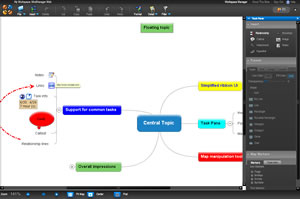
MindManager Web opens to a Mindjet Connect-like workspace, where you can create new maps, access existing ones, manage collaborators who will be sharing the workspace, and import documents into it.
The web mapping application contains a simplified ribbon toolbar, which supports common visual mapping tasks. A set of tabbed panes on the right side of the workspace provides access to map and topic level formatting options. An “insert” pane helps you to quickly add attachments, hyperlinks, images, notes, callouts, boundaries and relationship lines. A “format” pane gives you complete control over topic, text, image and map layout settings. And a “map markers” pane not only gives you access to a well-rounded collection of topic symbols, but you can create your own marker groups. This set of three tabbed panes can be closed if you want more space for your map. A notes pane can be displayed or hidden at the bottom of the screen. The area below the workspace also contains tools for controlling your view of the map, including a zoom slider, “fit to map,” “center map” and “find” commands.
When adding topics to your map, MindManager Web behaves just like you would expect it to: To add a topic, you simply click the enter key, type the name of your topic and click the Enter key. The simplified toolbar makes it easy to add markers (symbols), hyperlinks, notes, callouts, relationship lines and other elements to your map. MindManager Web also supports detailed task information, including start and end dates, percentage complete and priority. Surprisingly, MindManager Web provides ample support for right-click commands, and notes even display a tool tip you mouse over them.
Real-time collaboration
Not surprisingly, MindManager Web supports real-time collaboration on mind maps; users of MindManager Pro and Web can even work on a map at the same time via the Connect workspace- very cool! In addition, the files created in MindManager Web are compatible with MindManager 7. This means you can easily move your maps between the two platforms. Of course, because MindManager Web is aimed at first-time users of visual mapping, it doesn’t support all of the advanced features and functionality of the desktop version. But MindManager Web is so full-featured that most users won’t even notice.
It’s sometimes the little things that make a software or web application really stand out. When no topics are selected, the toolbars and panels that contain topic-specific commands are grayed out. The black toolbars and task panes have a very elegant look to them, and topics have a slight 3-D effect applied to them. Screen animations are smooth, adding to the impression is that this is a very polished web application. For example, selecting the “center map” command causes the map to slide gently to the side until it is centered in the workspace. Likewise, clicking on the notes toolbar button causes the notes pane to slide smoothly into view at the bottom of the screen. This isn’t some college student’s latest Ruby on Rails project, but a very well-designed web application.
Conclusion
I recently stated in this blog that it would be wonderful if a developer of desktop mind mapping software would create a web client that would offer a seamless online and off-line visual mapping experience for users. With MindManager Web, Mindjet has achieved this.
Overall, MindManager Web provides a mapping experience that is at least a level above any other web-based mind mapping application. Mindjet obviously invested a lot of time in user interface design, to ensure that this would be a highly functional, easy-to-use tool.
Leave a Reply