
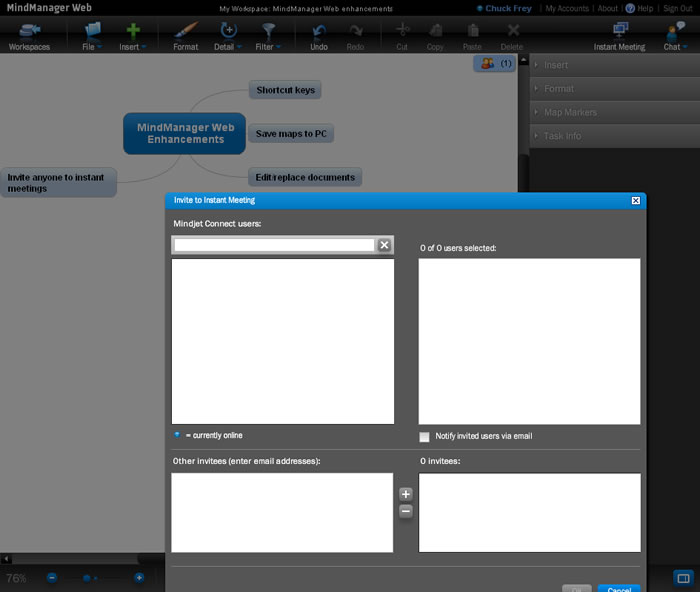
 Michael Deutch, writing in the Mindjet Blog, recently announced some significant updates and enhancements to MindManager Web, the web-based version of the popular mind mapping tool. This update includes over 100 usability improvements, such as:
Support for shortcut keys (37 in all), which should significantly increase your productivity with the application. You can use keyboard commands for everything from adding new topic (INS key), zoom in and out, and add boundary to selecting topics, formatting topic text and opening and closing notes and task panels. I was very pleased with how these keyboard shortcuts give this web application a very desktop software-like feel.
You can now save maps on your PC as .MMAP files and share them with other MindManager users. In the past, if you wanted to do this, you would need to utilize the Mindjet Connect collaborative workspace tool to pull online maps down to your computer. Now you can save a map created within MindManager Web directly as a.MM AP file.
You can edit and replace documents in your workspace. This gives you a means to replace workspace files (but not maps) quickly and easily. When you replace a file, the new file is uploaded to the workspace and the original file is immediately destroyed. All the attributes of the original file are retained, and links to the file remain functional. If the file you upload has a different name, you can choose to use either the name of the original workspace file or the name of the uploaded file.
You can now invite anyone to instant meetings. If the person you’re inviting is a Mindjet Connect user, the invitation will appear as a pop-up window on their screen. If they are not a Connect user, you can invite them to view or collaborate on your map via an e-mail invitation. Clicking on the link in the e-mail starts the download of the software that’s needed to support the instant meeting.
MindManager Web is getting much closer to delivering an experience equivalent to utilizing a desktop mind mapping tool, according to Alan Yoshioka, who recently wrote a very positive review of MindManager Web on his Mobile Musings Blog. In his opinion, the real sweet spot for this application is its recently enhanced instant meeting and chat capabilities. I encourage you to read his blog post to learn more.
Watch for a full review of MindManager Web on this blog in the near future!
Leave a Reply